# lab07-VxLAN\&M-LAG
### Task VXLAN. Multihoming
Configure a resilient client connection using EVPN Multihoming.
Подключите клиентов 2-я линками к различным Leaf Настроите агрегированный канал со стороны клиента Настроите multihoming для работы в Overlay сети. Если используете Cisco NXOS - vPC, если иной вендор - то ESI LAG (либо MC-LAG с поддержкой VXLAN) Зафиксируете в документации - план работы, адресное пространство, схему сети, конфигурацию устройств Опционально - протестировать отказоустойчивость - убедиться, что связнность не теряется при отключении одного из линков
• Connect the client using two physical links to different Leaf switches
• Configure a link aggregation group (LAG) on the client side
• Set up EVPN multihoming for operation within the overlay network
◦ If using Cisco NXOS, implement vPC
◦ For other vendors, configure ESI-LAG or MC-LAG with VXLAN support
• Test failover behavior:
◦ Verify that connectivity is maintained when one of the links is disconnected
### **Network diagram**

Due to functional limitations in FRR, we’re switching the Leaf vendor to Arista. FRR is fundamentally a routing stack, and switch-like functionality is implemented via underlying Linux tools — which makes it unsuitable for native switching features. In particular, MLAG could not be brought up on FRR-based nodes. We’ll keep Linux with bonding as the client platform. The lab is built using the following role-based device mapping host- linux, leaf - arista, spine - arista
### **Underlay IP Address Allocation**
• Underlay addressing follows the format 10.x.y.z, where:
◦ x = Data Center ID
◦ y = Spine switch ID
◦ z = Sequential host address per leaf connection
• Host addressing uses the 172.16.x.z/24 format, where:
◦ x = Leaf switch ID
◦ z = Sequential host address
◦ Each leaf switch uses .1 as its own IP in the corresponding subnet
• Loopback addressing uses 192.168.a.b/32, where:
◦ a = 1 for spine switches
◦ a = 2 for leaf switches
◦ b = Spine or leaf ID (assigned sequentially)
• IPv6 addressing uses fd00::\[IPv4]
Interconnect ipv4 ipv6
| Device A | Interface A | IPv4 A | IPv6 A | Device B | Interface B | IPv4 B | IPv6 B |
| -------- | ----------- | -------------- | -------------------- | -------- | ----------- | ---------------- | ------------------ |
| Spine-1 | Eth1 | 10.1.1.0/31 | fd00::10:1:1:0/127 | Leaf-1 | Eth1 | 10.1.1.1/31 | fd00::10:1:1:1/127 |
| Spine-1 | Eth2 | 10.1.1.2/31 | fd00::10:1:1:2/127 | Leaf-2 | Eth1 | 10.1.1.3/31 | fd00::10:1:1:3/127 |
| Spine-1 | Eth3 | 10.1.1.4/31 | fd00::10:1:1:4/127 | Leaf-3 | Eth1 | 10.1.1.5/31 | fd00::10:1:1:5/127 |
| Spine-1 | Eth4 | 10.1.1.6/31 | fd00::10:1:1:6/127 | Leaf-4 | Eth1 | 10.1.1.7/31 | fd00::10:1:1:7/127 |
| Spine-2 | Eth1 | 10.1.2.0/31 | fd00::10:1:2:0/127 | Leaf-1 | Eth2 | 10.1.2.1/31 | fd00::10:1:2:1/127 |
| Spine-2 | Eth2 | 10.1.2.2/31 | fd00::10:1:2:2/127 | Leaf-2 | Eth2 | 10.1.2.3/31 | fd00::10:1:2:3/127 |
| Spine-2 | Eth3 | 10.1.2.4/31 | fd00::10:1:2:4/127 | Leaf-3 | Eth2 | 10.1.2.5/31 | fd00::10:1:2:5/127 |
| Spine-2 | Eth4 | 10.1.2.6/31 | fd00::10:1:2:6/127 | Leaf-4 | Eth2 | 10.1.2.7/31 | fd00::10:1:2:7/127 |
| Leaf-1 | Eth3 | 10.0.1.0/31 | fd00::10:0:1:0/127 | Leaf-2 | Eth3 | 10.0.1.1/31 | fd00::10:0:1:1/127 |
| Leaf-3 | Eth3 | 10.0.1.2/31 | fd00::10:0:1:2/127 | Leaf-4 | Eth3 | 10.0.1.3/31 | fd00::10:0:1:3/127 |
| Leaf-1 | Eth4 | ------------ | ------------ | Leaf-2 | Eth4 | ------------ | ------------ |
| Leaf-3 | Eth4 | ------------ | ------------ | Leaf-4 | Eth4 | ------------ | ------------ |
| Host-1 | Eth1 | 172.16.1.11/24 | fd00::172:16:1:b/116 | Leaf-1 | Eth5 | access vlan red | access vlan red |
| Host-1 | Eth2 | 172.16.1.11/24 | fd00::172:16:1:b/116 | Leaf-2 | Eth5 | access vlan red | access vlan red |
| Host-2 | Eth1 | 172.16.1.12/24 | fd00::172:16:1:c/116 | Leaf-3 | Eth5 | access vlan red | access vlan red |
| Host-2 | Eth2 | 172.16.1.12/24 | fd00::172:16:1:с/116 | Leaf-4 | Eth5 | access vlan red | access vlan red |
| Host-3 | Eth1 | 172.16.2.13/24 | fd00::172:16:2:d/116 | Leaf-1 | Eth6 | access vlan blue | access vlan blue |
| Host-3 | Eth2 | 172.16.2.13/24 | fd00::172:16:2:d/116 | Leaf-2 | Eth6 | access vlan blue | access vlan blue |
| Host-4 | Eth1 | 172.16.2.14/24 | fd00::172:16:2:e/116 | Leaf-3 | Eth6 | access vlan blue | access vlan blue |
| Host-4 | Eth2 | 172.16.2.14/24 | fd00::172:16:2:e/116 | Leaf-4 | Eth6 | access vlan blue | access vlan blue |
loopback
| Device | Loopback ipv4 | loopback ipv6 |
| ------- | ------------- | ----------------- |
| Spine-1 | 192.168.1.1 | fd00::192:168:1:1 |
| Spine-2 | 192.168.1.2 | fd00::192:168:1:2 |
| Leaf-1 | 192.168.2.1 | fd00::192:168:2:1 |
| Leaf-2 | 192.168.2.2 | fd00::192:168:2:2 |
| Leaf-3 | 192.168.2.3 | fd00::192:168:2:3 |
| Leaf-4 | 192.168.2.4 | fd00::192:168:2:4 |
Network based on ospf(underlay)+ibgp(overlay). Area ospf 0, bgp as 65500
### **Launching a lab in the Netlab**
There were no special launch requirements. To avoid mixing services and transport into a single namespace, I introduced a dedicated VRF called user, where both vlan-if interfaces were placed — allowing the hosts to communicate with each other. Since I typically work with a centralized gateway model (where L3 terminates on the border leaf), I decided to experiment with a distributed gateway to understand how it’s configured and how it forwards traffic. One caveat: the `gateway` module that handles FHRP protocols only stretches IPv4 addresses across devices. Attempts to extend this behavior to IPv6 weren’t very successful.
File [Topology](https://github.com/aeangel/otus-DC-net/blob/main/lab07/topology.yml) For quick reference, here’s the inline listing:
topology.yml
```yml
---
p---
provider: clab
module: [ vlan,vxlan,ospf,bgp,evpn,bfd,lag ]
plugin: [ bgp.session ]
#bgp
bgp.bfd: True
bgp:
as: 65500
rr_list: [ s1,s2 ]
rr_mesh: False
tools:
edgeshark:
graphite:
nodes:
s1:
device: eos
id: 1
loopback:
ipv4: 192.168.1.1/32
ipv6: fd00::192:168:1:1/128
s2:
device: eos
id: 2
loopback:
ipv4: 192.168.1.2/32
ipv6: fd00::192:168:1:2/128
l1:
device: eos
id: 3
loopback:
ipv4: 192.168.2.1/32
ipv6: fd00::192:168:2:1/128
l2:
device: eos
id: 4
loopback:
ipv4: 192.168.2.2/32
ipv6: fd00::192:168:2:2/128
l3:
device: eos
id: 5
loopback:
ipv4: 192.168.2.3/32
ipv6: fd00::192:168:2:3/128
l4:
device: eos
id: 6
loopback:
ipv4: 192.168.2.4/32
ipv6: fd00::192:168:2:4/128
h1:
id: 11
module: [ lag ]
device: linux
h2:
id: 12
module: [ lag ]
device: linux
h3:
id: 13
module: [ lag ]
device: linux
h4:
id: 14
module: [ lag ]
device: linux
#vlan
vlans:
red:
mode: bridge
prefix:
ipv4: 172.16.1.0/24
ipv6: fd00::172:16:1:0/116
blue:
mode: bridge
prefix:
ipv4: 172.16.2.0/24
ipv6: fd00::172:16:2:0/116
links:
#spine1-leaf1,2,3,4
- interfaces:
- node: s1
ifname: eth1
ipv4: 10.1.1.0
ipv6: fd00::10:1:1:0
ospf:
password: 'spine1'
bfd: true
- node: l1
ifname: eth1
ipv4: 10.1.1.1
ipv6: fd00::10:1:1:1
ospf:
password: 'spine1'
bfd: true
prefix:
ipv4: 10.1.1.0/31
ipv6: fd00::10:1:1:0/127
- interfaces:
- node: s1
ifname: eth2
ipv4: 10.1.1.2
ipv6: fd00::10:1:1:2
ospf:
password: 'spine1'
bfd: true
- node: l2
ifname: eth1
ipv4: 10.1.1.3
ipv6: fd00::10:1:1:3
ospf:
password: 'spine1'
bfd: true
prefix:
ipv4: 10.1.1.2/31
ipv6: fd00::10:1:1:2/127
- interfaces:
- node: s1
ifname: eth3
ipv4: 10.1.1.4
ipv6: fd00::10:1:1:4
ospf:
password: 'spine1'
bfd: true
- node: l3
ifname: eth1
ipv4: 10.1.1.5
ipv6: fd00::10:1:1:5
ospf:
password: 'spine1'
bfd: true
prefix:
ipv4: 10.1.1.4/31
ipv6: fd00::10:1:1:4/127
- interfaces:
- node: s1
ifname: eth4
ipv4: 10.1.1.6
ipv6: fd00::10:1:1:6
ospf:
password: 'spine1'
bfd: true
- node: l4
ifname: eth1
ipv4: 10.1.1.7
ipv6: fd00::10:1:1:7
ospf:
password: 'spine1'
bfd: true
prefix:
ipv4: 10.1.1.6/31
ipv6: fd00::10:1:1:6/127
#spine2-leaf1,2,3,4
- interfaces:
- node: s2
ifname: eth1
ipv4: 10.1.2.0
ipv6: fd00::10:1:2:0
ospf:
password: 'spine2'
bfd: true
- node: l1
ifname: eth2
ipv4: 10.1.2.1
ipv6: fd00::10:1:2:1
ospf:
password: 'spine2'
bfd: true
prefix:
ipv4: 10.1.2.0/31
ipv6: fd00::10:1:2:0/127
- interfaces:
- node: s2
ifname: eth2
ipv4: 10.1.2.2
ipv6: fd00::10:1:2:2
ospf:
password: 'spine2'
bfd: true
- node: l2
ifname: eth2
ipv4: 10.1.2.3
ipv6: fd00::10:1:2:3
ospf:
password: 'spine2'
bfd: true
prefix:
ipv4: 10.1.2.2/31
ipv6: fd00::10:1:2:2/127
- interfaces:
- node: s2
ifname: eth3
ipv4: 10.1.2.4
ipv6: fd00::10:1:2:4
ospf:
password: 'spine2'
bfd: true
- node: l3
ifname: eth2
ipv4: 10.1.2.5
ipv6: fd00::10:1:2:5
ospf:
password: 'spine2'
bfd: true
prefix:
ipv4: 10.1.2.4/31
ipv6: fd00::10:1:2:4/127
- interfaces:
- node: s2
ifname: eth4
ipv4: 10.1.2.6
ipv6: fd00::10:1:2:6
ospf:
password: 'spine2'
bfd: true
- node: l4
ifname: eth2
ipv4: 10.1.2.7
ipv6: fd00::10:1:2:7
ospf:
password: 'spine2'
bfd: true
prefix:
ipv4: 10.1.2.6/31
ipv6: fd00::10:1:2:6/127
#l1-l2
- interfaces:
- node: l1
ifname: eth3
ipv4: 10.0.1.0
ipv6: fd00::10:0:1:0
ospf:
password: 'lag1'
bfd: true
- node: l2
ifname: eth3
ipv4: 10.0.1.1
ipv6: fd00::10:0:1:1
ospf:
password: 'lag1'
bfd: true
prefix:
ipv4: 10.0.1.0/31
ipv6: fd00::10:0:1:0/127
#l3-l4
- interfaces:
- node: l3
ifname: eth3
ipv4: 10.0.1.2
ipv6: fd00::10:0:1:2
ospf:
password: 'lag2'
bfd: true
- node: l4
ifname: eth3
ipv4: 10.0.1.3
ipv6: fd00::10:0:1:3
ospf:
password: 'lag2'
bfd: true
prefix:
ipv4: 10.0.1.2/31
ipv6: fd00::10:0:1:2/127
#downlink + mlag
- lag:
members: [l1-l2]
mlag.peergroup: 1
- lag:
members: [l3-l4]
mlag.peergroup: 2
- lag:
members: [h1-l1, h1-l2]
vlan.access: red
- lag:
members: [l3-h2, l4-h2]
vlan.access: red
- lag:
members: [h3-l1, h3-l2]
vlan.access: blue
- lag:
members: [h4-l3, h4-l4]
vlan.access: blue
```
### **Validating**
First, we verify basic connectivity with ping tests. It’s probably a good time to start integrating automated validation. To do this, we add a validate block to the topology file.
validate
```txt
validate:
wait:
description: Waiting for stabilize
wait: 45
ping1:
description: Pinging H2 from H1
nodes: [ h1 ]
devices: [ linux ]
exec: ping -c 10 h2 -A
valid: |
"64 bytes" in stdout
ping2:
description: Pinging H4 from H3
nodes: [ h3 ]
devices: [ linux ]
exec: ping -c 10 h3 -A
valid: |
"64 bytes" in stdout
ping3:
description: Pinging ipv6 H1 from H2
nodes: [ h2 ]
devices: [ linux ]
exec: ping6 -c 10 h1 -A
valid: |
"64 bytes" in stdout
ping4:
description: Pinging ipv6 H3 from H4
nodes: [ h4 ]
devices: [ linux ]
exec: ping6 -c 10 h3 -A
valid: |
"64 bytes" in stdout
```
Input `netlab validate` and see:
netlab validate
```txt
[wait] Waiting for stabilize
[ping1] Pinging H2 from H1 [ node(s): h1 ]
[PASS] Validation succeeded on h1
[PASS] Test succeeded in 0.1 seconds
[ping2] Pinging H4 from H3 [ node(s): h3 ]
[PASS] Validation succeeded on h3
[PASS] Test succeeded in 0.1 seconds
[ping3] Pinging ipv6 H1 from H2 [ node(s): h2 ]
[PASS] Validation succeeded on h2
[PASS] Test succeeded in 0.1 seconds
[ping4] Pinging ipv6 H3 from H4 [ node(s): h4 ]
[PASS] Validation succeeded on h4
[PASS] Test succeeded in 0.1 seconds
[SUCCESS] Tests passed: 4
```
It’s beautiful, really — sometimes it feels like cheating. The lab builds itself, validates itself, and the only thing that requires real effort is writing a proper YAML topology file. Let’s take a look at what spine-2 knows about our hosts.
Since EVPN is up over both IPv4 and IPv6, things are about to get interesting. To make it easier to interpret, let’s introduce a MAC address table for the devices.
| Host | MAC | ipv4 | ipv6 | ipv6 local | vlan | vni |
| ---- | ----------------- | -------------- | -------------------- | ---------------------------- | ---- | ------ |
| h1 | aa:c1:ab:31:a1:6f | 172.16.1.11/24 | fd00::172:16:1:b/116 | fe80::a8c1:abff:fe0d:85f0/64 | red | 101000 |
| h2 | aa:c1:ab:82:c9:3c | 172.16.2.12/24 | fd00::172:16:2:c/116 | fe80::a8c1:abff:fea5:c348/64 | red | 101000 |
| h3 | aa:c1:ab:e6:14:53 | 172.16.1.13/24 | fd00::172:16:1:d/116 | fe80::a8c1:abff:fecb:d425/64 | blue | 101001 |
| h4 | aa:c1:ab:a6:ff:af | 172.16.2.14/24 | fd00::172:16:2:e/116 | fe80::a8c1:abff:fe60:b145/64 | blue | 101001 |
spine-1 show evpn
```
s2#show bgp evpn vni 101000
BGP routing table information for VRF default
Router identifier 192.168.1.2, local AS number 65500
Route status codes: * - valid, > - active, S - Stale, E - ECMP head, e - ECMP
c - Contributing to ECMP, % - Pending best path selection
Origin codes: i - IGP, e - EGP, ? - incomplete
AS Path Attributes: Or-ID - Originator ID, C-LST - Cluster List, LL Nexthop - Link Local Nexthop
Network Next Hop Metric LocPref Weight Path
* >Ec RD: 192.168.2.1:1000 mac-ip aac1.ab31.a16f
192.168.2.1 - 100 0 i
* ec RD: 192.168.2.1:1000 mac-ip aac1.ab31.a16f
192.168.2.1 - 100 0 i
* >Ec RD: 192.168.2.2:1000 mac-ip aac1.ab31.a16f
192.168.2.2 - 100 0 i
* ec RD: 192.168.2.2:1000 mac-ip aac1.ab31.a16f
192.168.2.2 - 100 0 i
* >Ec RD: 192.168.2.3:1000 mac-ip aac1.ab82.c93c
192.168.2.3 - 100 0 i
* ec RD: 192.168.2.3:1000 mac-ip aac1.ab82.c93c
192.168.2.3 - 100 0 i
* >Ec RD: 192.168.2.4:1000 mac-ip aac1.ab82.c93c
192.168.2.4 - 100 0 i
* ec RD: 192.168.2.4:1000 mac-ip aac1.ab82.c93c
192.168.2.4 - 100 0 i
* >Ec RD: 192.168.2.1:1000 imet 192.168.2.1
192.168.2.1 - 100 0 i
* ec RD: 192.168.2.1:1000 imet 192.168.2.1
192.168.2.1 - 100 0 i
* >Ec RD: 192.168.2.2:1000 imet 192.168.2.2
192.168.2.2 - 100 0 i
* ec RD: 192.168.2.2:1000 imet 192.168.2.2
192.168.2.2 - 100 0 i
* >Ec RD: 192.168.2.3:1000 imet 192.168.2.3
192.168.2.3 - 100 0 i
* ec RD: 192.168.2.3:1000 imet 192.168.2.3
192.168.2.3 - 100 0 i
* >Ec RD: 192.168.2.4:1000 imet 192.168.2.4
192.168.2.4 - 100 0 i
* ec RD: 192.168.2.4:1000 imet 192.168.2.4
192.168.2.4 - 100 0 i
s2#show bgp evpn vni 101001
BGP routing table information for VRF default
Router identifier 192.168.1.2, local AS number 65500
Route status codes: * - valid, > - active, S - Stale, E - ECMP head, e - ECMP
c - Contributing to ECMP, % - Pending best path selection
Origin codes: i - IGP, e - EGP, ? - incomplete
AS Path Attributes: Or-ID - Originator ID, C-LST - Cluster List, LL Nexthop - Link Local Nexthop
Network Next Hop Metric LocPref Weight Path
* >Ec RD: 192.168.2.3:1001 mac-ip aac1.aba6.ffaf
192.168.2.3 - 100 0 i
* ec RD: 192.168.2.3:1001 mac-ip aac1.aba6.ffaf
192.168.2.3 - 100 0 i
* >Ec RD: 192.168.2.4:1001 mac-ip aac1.aba6.ffaf
192.168.2.4 - 100 0 i
* ec RD: 192.168.2.4:1001 mac-ip aac1.aba6.ffaf
192.168.2.4 - 100 0 i
* >Ec RD: 192.168.2.1:1001 mac-ip aac1.abe6.1453
192.168.2.1 - 100 0 i
* ec RD: 192.168.2.1:1001 mac-ip aac1.abe6.1453
192.168.2.1 - 100 0 i
* >Ec RD: 192.168.2.2:1001 mac-ip aac1.abe6.1453
192.168.2.2 - 100 0 i
* ec RD: 192.168.2.2:1001 mac-ip aac1.abe6.1453
192.168.2.2 - 100 0 i
* >Ec RD: 192.168.2.1:1001 imet 192.168.2.1
192.168.2.1 - 100 0 i
* ec RD: 192.168.2.1:1001 imet 192.168.2.1
192.168.2.1 - 100 0 i
* >Ec RD: 192.168.2.2:1001 imet 192.168.2.2
192.168.2.2 - 100 0 i
* ec RD: 192.168.2.2:1001 imet 192.168.2.2
192.168.2.2 - 100 0 i
* >Ec RD: 192.168.2.3:1001 imet 192.168.2.3
192.168.2.3 - 100 0 i
* ec RD: 192.168.2.3:1001 imet 192.168.2.3
192.168.2.3 - 100 0 i
* >Ec RD: 192.168.2.4:1001 imet 192.168.2.4
192.168.2.4 - 100 0 i
* ec RD: 192.168.2.4:1001 imet 192.168.2.4
192.168.2.4 - 100 0 i
```
We’ve already covered L2 VNIs in Lab 5, so now let’s focus on our MLAG configuration.
leaf-1 leaf-2 show mlag detail
```
=======leaf-2=========
l2#show mlag detail
MLAG Configuration:
domain-id : mlag1
local-interface : Vlan4094
peer-address : 169.254.127.0
peer-link : Port-Channel4094
hb-peer-address : 0.0.0.0
peer-config : consistent
MLAG Status:
state : Active
negotiation status : Connected
peer-link status : Up
local-int status : Up
system-id : 02:1c:73:34:45:3a
dual-primary detection : Disabled
dual-primary interface errdisabled : False
MLAG Ports:
Disabled : 0
Configured : 0
Inactive : 0
Active-partial : 0
Active-full : 2
MLAG Detailed Status:
State : primary
Peer State : secondary
State changes : 2
Last state change time : 0:20:51 ago
Hardware ready : True
Failover : False
Failover Cause(s) : Unknown
Last failover change time : never
Secondary from failover : False
Peer MAC address : 00:1c:73:43:43:66
Peer MAC routing supported : False
Reload delay : 300 seconds
Non-MLAG reload delay : 300 seconds
Peer ports errdisabled : False
Lacp standby : False
Configured heartbeat interval : 4000 ms
Effective heartbeat interval : 4000 ms
Heartbeat timeout : 60000 ms
Last heartbeat timeout : never
Heartbeat timeouts since reboot : 0
UDP heartbeat alive : True
Heartbeats sent/received : 313/314
Peer monotonic clock offset : -0.000096 seconds
Agent should be running : True
P2p mount state changes : 1
Fast MAC redirection enabled : False
Interface activation interlock : unsupported
=======leaf-1=========
l1#show mlag detail
MLAG Configuration:
domain-id : mlag1
local-interface : Vlan4094
peer-address : 169.254.127.1
peer-link : Port-Channel4094
hb-peer-address : 0.0.0.0
peer-config : consistent
MLAG Status:
state : Active
negotiation status : Connected
peer-link status : Up
local-int status : Up
system-id : 02:1c:73:34:45:3a
dual-primary detection : Disabled
dual-primary interface errdisabled : False
MLAG Ports:
Disabled : 0
Configured : 0
Inactive : 0
Active-partial : 0
Active-full : 2
MLAG Detailed Status:
State : secondary
Peer State : primary
State changes : 2
Last state change time : 0:21:08 ago
Hardware ready : True
Failover : False
Failover Cause(s) : Unknown
Last failover change time : never
Secondary from failover : False
Peer MAC address : 00:1c:73:34:45:3a
Peer MAC routing supported : False
Reload delay : 300 seconds
Non-MLAG reload delay : 300 seconds
Ports errdisabled : False
Lacp standby : False
Configured heartbeat interval : 4000 ms
Effective heartbeat interval : 4000 ms
Heartbeat timeout : 60000 ms
Last heartbeat timeout : never
Heartbeat timeouts since reboot : 0
UDP heartbeat alive : True
Heartbeats sent/received : 317/318
Peer monotonic clock offset : 0.000055 seconds
Agent should be running : True
P2p mount state changes : 1
Fast MAC redirection enabled : False
Interface activation interlock : unsupported
```
Here are leaf-3 leaf-4
leaf-3 leaf-4 show mlag detail
```
=======leaf-3=========
l3#show mlag detail
MLAG Configuration:
domain-id : mlag2
local-interface : Vlan4094
peer-address : 169.254.127.1
peer-link : Port-Channel4094
hb-peer-address : 0.0.0.0
peer-config : consistent
MLAG Status:
state : Active
negotiation status : Connected
peer-link status : Up
local-int status : Up
system-id : 02:1c:73:3d:6b:db
dual-primary detection : Disabled
dual-primary interface errdisabled : False
MLAG Ports:
Disabled : 0
Configured : 0
Inactive : 0
Active-partial : 0
Active-full : 2
MLAG Detailed Status:
State : primary
Peer State : secondary
State changes : 2
Last state change time : 0:25:52 ago
Hardware ready : True
Failover : False
Failover Cause(s) : Unknown
Last failover change time : never
Secondary from failover : False
Peer MAC address : 00:1c:73:65:7b:2c
Peer MAC routing supported : False
Reload delay : 300 seconds
Non-MLAG reload delay : 300 seconds
Peer ports errdisabled : False
Lacp standby : False
Configured heartbeat interval : 4000 ms
Effective heartbeat interval : 4000 ms
Heartbeat timeout : 60000 ms
Last heartbeat timeout : never
Heartbeat timeouts since reboot : 0
UDP heartbeat alive : True
Heartbeats sent/received : 388/389
Peer monotonic clock offset : 0.000036 seconds
Agent should be running : True
P2p mount state changes : 1
Fast MAC redirection enabled : False
Interface activation interlock : unsupported
=======leaf-4=========
l4#show mlag detail
MLAG Configuration:
domain-id : mlag2
local-interface : Vlan4094
peer-address : 169.254.127.0
peer-link : Port-Channel4094
hb-peer-address : 0.0.0.0
peer-config : consistent
MLAG Status:
state : Active
negotiation status : Connected
peer-link status : Up
local-int status : Up
system-id : 02:1c:73:3d:6b:db
dual-primary detection : Disabled
dual-primary interface errdisabled : False
MLAG Ports:
Disabled : 0
Configured : 0
Inactive : 0
Active-partial : 0
Active-full : 2
MLAG Detailed Status:
State : secondary
Peer State : primary
State changes : 2
Last state change time : 0:26:04 ago
Hardware ready : True
Failover : False
Failover Cause(s) : Unknown
Last failover change time : never
Secondary from failover : False
Peer MAC address : 00:1c:73:3d:6b:db
Peer MAC routing supported : False
Reload delay : 300 seconds
Non-MLAG reload delay : 300 seconds
Ports errdisabled : False
Lacp standby : False
Configured heartbeat interval : 4000 ms
Effective heartbeat interval : 4000 ms
Heartbeat timeout : 60000 ms
Last heartbeat timeout : never
Heartbeat timeouts since reboot : 0
UDP heartbeat alive : True
Heartbeats sent/received : 391/392
Peer monotonic clock offset : -0.000049 seconds
Agent should be running : True
P2p mount state changes : 1
Fast MAC redirection enabled : False
Interface activation interlock : unsupported
```
Everything looks solid from all angles.
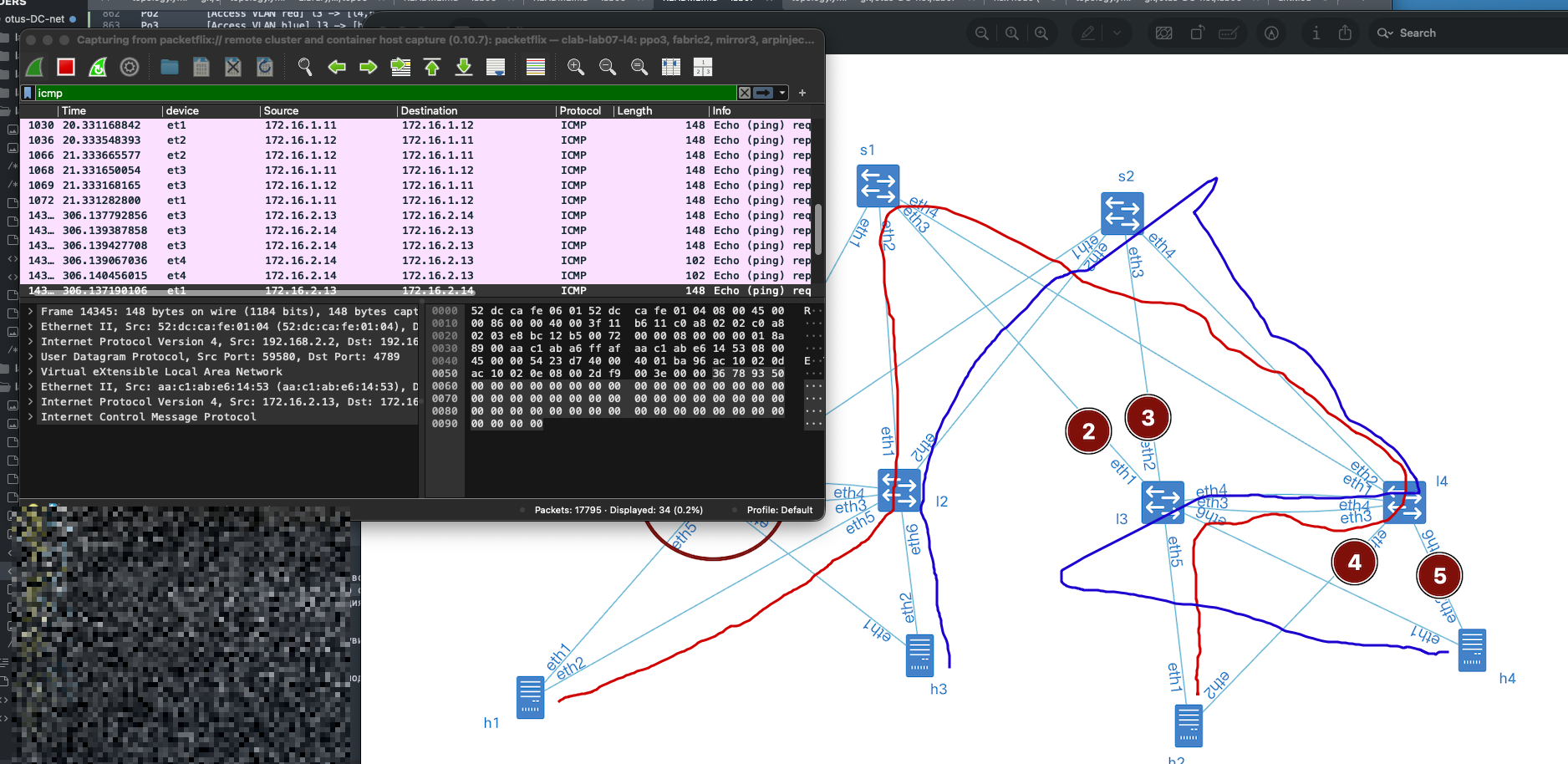
Now we need to understand whether this technology actually protects us from equipment or link failures. Let’s consider the following failure scenarios:
1\. We were performing a maintenance upgrade, and leaf-1 went down. (See point 1 in the diagram)
2\. It wasn’t just us — someone was working in the cross-connect, and all uplinks to leaf-3 were damaged. (Points 2–3 in the diagram)
3\. The day of disasters continued: on leaf-4, the interface module facing the servers burned out. (Points 4–5 in the diagram)
We’ll simulate all failures by shutting down the relevant interfaces.
Wrote the failure scenario — and honestly, it’s terrifying. I can only imagine what kind of panic this would trigger in the monitoring system 😅.

Interface status
show interface status
```
======= leaf-1 ==========
l1#show interfaces status
Port Name Status Vlan Duplex Speed Type Flags Encapsulation
Et1 l1 -> s1 disabled routed full 1G EbraTestPhyPort
Et2 l1 -> s2 disabled routed full 1G EbraTestPhyPort
Et3 l1 -> l2 disabled routed full 1G EbraTestPhyPort
Et4 l1 -> l2 (peerlink in channel-group 4094) disabled in Po4094 full 1G EbraTestPhyPort
Et5 l1 -> h1 in channel-group 1 disabled in Po1 full 1G EbraTestPhyPort
Et6 l1 -> h3 in channel-group 2 disabled in Po2 full 1G EbraTestPhyPort
Ma0 connected routed a-full a-1G 10/100/1000
Po1 [Access VLAN red] l1 -> [h1,l2] (part of mlag 1) notconnect 1000 full unconf N/A
Po2 [Access VLAN blue] l1 -> [h3,l2] (part of mlag 2) notconnect 1001 full unconf N/A
Po4094 MLAG peerlink(s) l1 -> l2 notconnect trunk full unconf N/A
======= leaf-2 ==========
l2#show interfaces status
Port Name Status Vlan Duplex Speed Type Flags Encapsulation
Et1 l2 -> s1 connected routed full 1G EbraTestPhyPort
Et2 l2 -> s2 connected routed full 1G EbraTestPhyPort
Et3 l2 -> l1 notconnect routed full 1G EbraTestPhyPort
Et4 l2 -> l1 (peerlink in channel-group 4094) notconnect in Po4094 full 1G EbraTestPhyPort
Et5 l2 -> h1 in channel-group 1 connected in Po1 full 1G EbraTestPhyPort
Et6 l2 -> h3 in channel-group 2 connected in Po2 full 1G EbraTestPhyPort
Ma0 connected routed a-full a-1G 10/100/1000
Po1 [Access VLAN red] l2 -> [h1,l1] (part of mlag 1) connected 1000 full 1G N/A
Po2 [Access VLAN blue] l2 -> [h3,l1] (part of mlag 2) connected 1001 full 1G N/A
Po4094 MLAG peerlink(s) l2 -> l1 notconnect trunk full unconf N/A
======= leaf-3 ==========
l3#show interfaces status
Port Name Status Vlan Duplex Speed Type Flags Encapsulation
Et1 l3 -> s1 disabled routed full 1G EbraTestPhyPort
Et2 l3 -> s2 disabled routed full 1G EbraTestPhyPort
Et3 l3 -> l4 connected routed full 1G EbraTestPhyPort
Et4 l3 -> l4 (peerlink in channel-group 4094) connected in Po4094 full 1G EbraTestPhyPort
Et5 l3 -> h2 in channel-group 2 connected in Po2 full 1G EbraTestPhyPort
Et6 l3 -> h4 in channel-group 3 connected in Po3 full 1G EbraTestPhyPort
Ma0 connected routed a-full a-1G 10/100/1000
Po2 [Access VLAN red] l3 -> [l4,h2] (part of mlag 2) connected 1000 full 1G N/A
Po3 [Access VLAN blue] l3 -> [h4,l4] (part of mlag 3) connected 1001 full 1G N/A
Po4094 MLAG peerlink(s) l3 -> l4 connected trunk full 1G N/A
======= leaf-4 ==========
l4#show interfaces status
Port Name Status Vlan Duplex Speed Type Flags Encapsulation
Et1 l4 -> s1 connected routed full 1G EbraTestPhyPort
Et2 l4 -> s2 connected routed full 1G EbraTestPhyPort
Et3 l4 -> l3 connected routed full 1G EbraTestPhyPort
Et4 l4 -> l3 (peerlink in channel-group 4094) connected in Po4094 full 1G EbraTestPhyPort
Et5 l4 -> h2 in channel-group 2 disabled in Po2 full 1G EbraTestPhyPort
Et6 l4 -> h4 in channel-group 3 disabled in Po3 full 1G EbraTestPhyPort
Ma0 connected routed a-full a-1G 10/100/1000
Po2 [Access VLAN red] l4 -> [l3,h2] (part of mlag 2) notconnect 1000 full 1G N/A
Po3 [Access VLAN blue] l4 -> [h4,l3] (part of mlag 3) notconnect 1001 full 1G N/A
Po4094 MLAG peerlink(s) l4 -> l3 connected trunk full 1G N/A
```
Run `netlab validate` and see
```
[wait] Waiting for stabilize
[ping1] Pinging H2 from H1 [ node(s): h1 ]
[PASS] Validation succeeded on h1
[PASS] Test succeeded in 0.1 seconds
[ping2] Pinging H4 from H3 [ node(s): h3 ]
[PASS] Validation succeeded on h3
[PASS] Test succeeded in 0.1 seconds
[ping3] Pinging ipv6 H1 from H2 [ node(s): h2 ]
[PASS] Validation succeeded on h2
[PASS] Test succeeded in 0.1 seconds
[ping4] Pinging ipv6 H3 from H4 [ node(s): h4 ]
[PASS] Validation succeeded on h4
[PASS] Test succeeded in 0.1 seconds
[SUCCESS] Tests passed: 4
```
#### Testing
The tests were successfully passed — despite our best efforts to break things. Of course, with a bit more creativity and a few extra shutdown commands, we could probably destabilize the lab further… but let’s show some mercy and proceed to collect the configurations.
For Wireshark enthusiasts — here’s a capture from leaf-4, taken across several validation runs. It clearly shows that traffic flows bidirectionally even during failure scenarios, confirming that EVPN multihoming and failover mechanisms are working as intended.
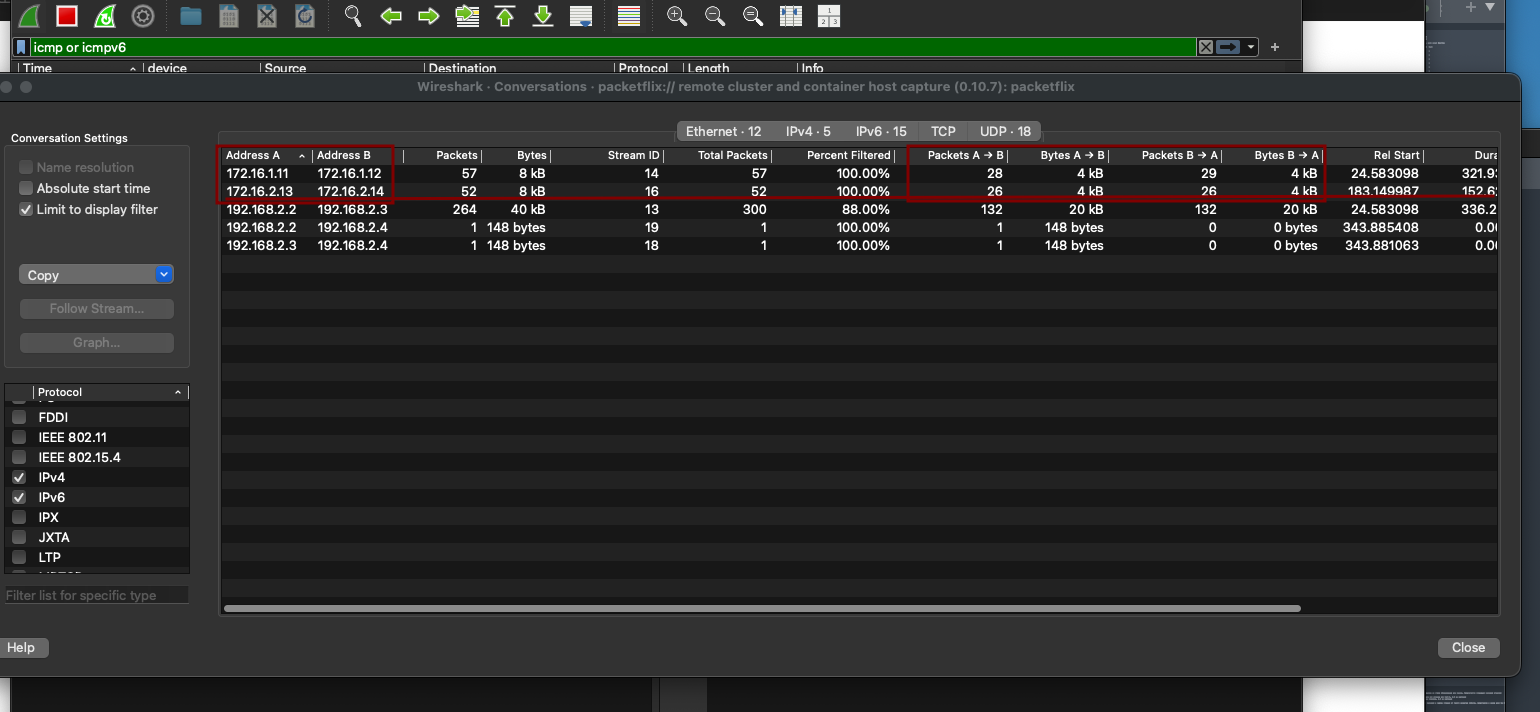
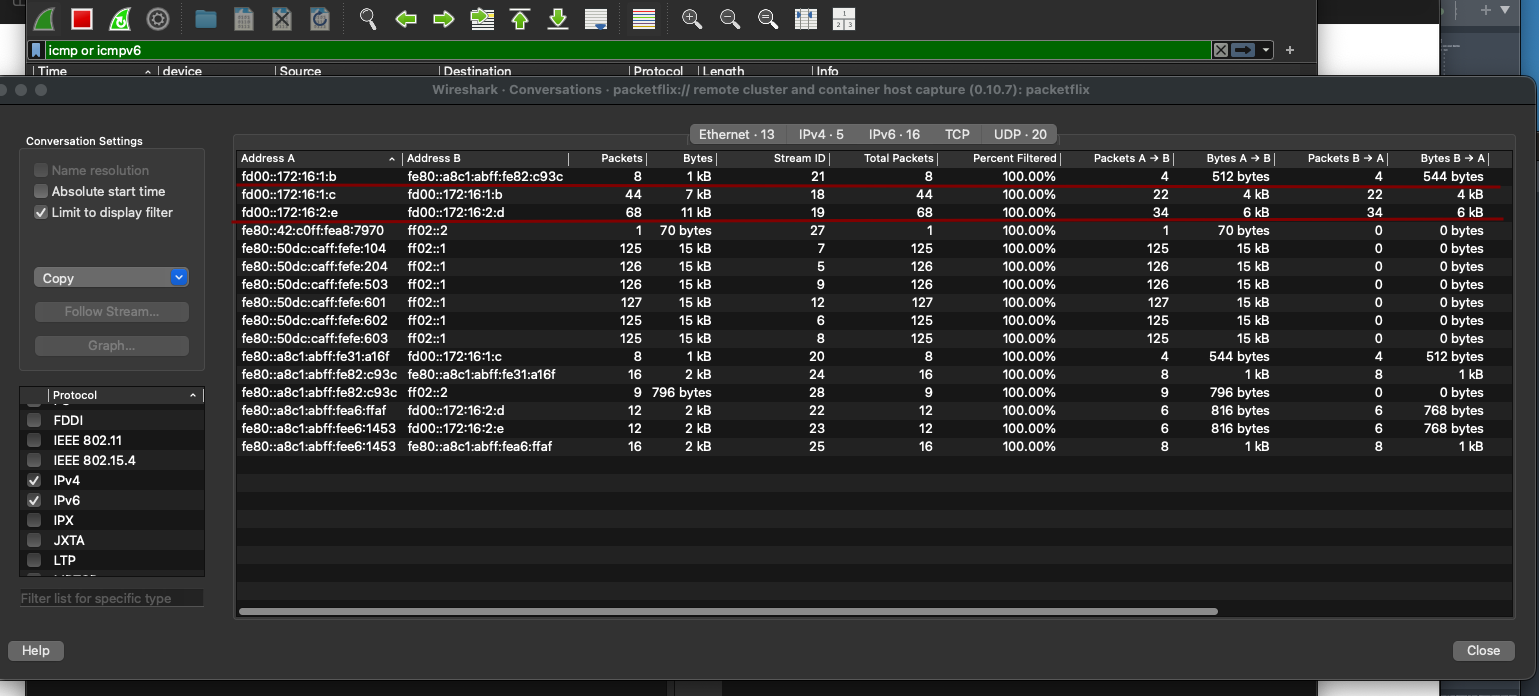 leaf-4 was chosen specifically because it allows us to observe how traffic shifts to the peer-link when attempting to reach hosts. We can see traffic flowing through eth3 and eth4, which connect leaf-3 and leaf-4:
• eth3 effectively acts as an alternate EVPN path. Since we’re using iBGP, the EVPN peering between leaf-3 and the spine remains intact — a backup route is simply installed. leaf-3 continues to advertise and receive EVPN routes from the rest of the fabric.
• eth4 serves as the peer-link for MLAG operation.
This setup demonstrates how traffic is rerouted through the peer-link during failure scenarios, maintaining connectivity without disrupting the control plane.
leaf-4 was chosen specifically because it allows us to observe how traffic shifts to the peer-link when attempting to reach hosts. We can see traffic flowing through eth3 and eth4, which connect leaf-3 and leaf-4:
• eth3 effectively acts as an alternate EVPN path. Since we’re using iBGP, the EVPN peering between leaf-3 and the spine remains intact — a backup route is simply installed. leaf-3 continues to advertise and receive EVPN routes from the rest of the fabric.
• eth4 serves as the peer-link for MLAG operation.
This setup demonstrates how traffic is rerouted through the peer-link during failure scenarios, maintaining connectivity without disrupting the control plane.
approve
```
l3#show bgp evpn
BGP routing table information for VRF default
Router identifier 192.168.2.3, local AS number 65500
Route status codes: * - valid, > - active, S - Stale, E - ECMP head, e - ECMP
c - Contributing to ECMP, % - Pending best path selection
Origin codes: i - IGP, e - EGP, ? - incomplete
AS Path Attributes: Or-ID - Originator ID, C-LST - Cluster List, LL Nexthop - Link Local Nexthop
Network Next Hop Metric LocPref Weight Path
* >Ec RD: 192.168.2.2:1000 mac-ip aac1.ab31.a16f
192.168.2.2 - 100 0 i Or-ID: 192.168.2.2 C-LST: 192.168.1.1
* ec RD: 192.168.2.2:1000 mac-ip aac1.ab31.a16f
192.168.2.2 - 100 0 i Or-ID: 192.168.2.2 C-LST: 192.168.1.1
* ec RD: 192.168.2.2:1000 mac-ip aac1.ab31.a16f
192.168.2.2 - 100 0 i Or-ID: 192.168.2.2 C-LST: 192.168.1.1
* ec RD: 192.168.2.2:1000 mac-ip aac1.ab31.a16f
192.168.2.2 - 100 0 i Or-ID: 192.168.2.2 C-LST: 192.168.1.1
* > RD: 192.168.2.3:1000 mac-ip aac1.ab82.c93c
- - - 0 i
* >Ec RD: 192.168.2.4:1000 mac-ip aac1.ab82.c93c
192.168.2.4 - 100 0 i Or-ID: 192.168.2.4 C-LST: 192.168.1.1
* ec RD: 192.168.2.4:1000 mac-ip aac1.ab82.c93c
192.168.2.4 - 100 0 i Or-ID: 192.168.2.4 C-LST: 192.168.1.1
* ec RD: 192.168.2.4:1000 mac-ip aac1.ab82.c93c
192.168.2.4 - 100 0 i Or-ID: 192.168.2.4 C-LST: 192.168.1.1
* ec RD: 192.168.2.4:1000 mac-ip aac1.ab82.c93c
192.168.2.4 - 100 0 i Or-ID: 192.168.2.4 C-LST: 192.168.1.1
* >Ec RD: 192.168.2.2:1000 imet 192.168.2.2
192.168.2.2 - 100 0 i Or-ID: 192.168.2.2 C-LST: 192.168.1.1
* ec RD: 192.168.2.2:1000 imet 192.168.2.2
192.168.2.2 - 100 0 i Or-ID: 192.168.2.2 C-LST: 192.168.1.1
* ec RD: 192.168.2.2:1000 imet 192.168.2.2
192.168.2.2 - 100 0 i Or-ID: 192.168.2.2 C-LST: 192.168.1.1
* ec RD: 192.168.2.2:1000 imet 192.168.2.2
192.168.2.2 - 100 0 i Or-ID: 192.168.2.2 C-LST: 192.168.1.1
* >Ec RD: 192.168.2.2:1001 imet 192.168.2.2
192.168.2.2 - 100 0 i Or-ID: 192.168.2.2 C-LST: 192.168.1.1
* ec RD: 192.168.2.2:1001 imet 192.168.2.2
192.168.2.2 - 100 0 i Or-ID: 192.168.2.2 C-LST: 192.168.1.1
* ec RD: 192.168.2.2:1001 imet 192.168.2.2
192.168.2.2 - 100 0 i Or-ID: 192.168.2.2 C-LST: 192.168.1.1
* ec RD: 192.168.2.2:1001 imet 192.168.2.2
192.168.2.2 - 100 0 i Or-ID: 192.168.2.2 C-LST: 192.168.1.1
* > RD: 192.168.2.3:1000 imet 192.168.2.3
- - - 0 i
* > RD: 192.168.2.3:1001 imet 192.168.2.3
- - - 0 i
* >Ec RD: 192.168.2.4:1000 imet 192.168.2.4
192.168.2.4 - 100 0 i Or-ID: 192.168.2.4 C-LST: 192.168.1.1
* ec RD: 192.168.2.4:1000 imet 192.168.2.4
192.168.2.4 - 100 0 i Or-ID: 192.168.2.4 C-LST: 192.168.1.1
* ec RD: 192.168.2.4:1000 imet 192.168.2.4
192.168.2.4 - 100 0 i Or-ID: 192.168.2.4 C-LST: 192.168.1.1
* ec RD: 192.168.2.4:1000 imet 192.168.2.4
192.168.2.4 - 100 0 i Or-ID: 192.168.2.4 C-LST: 192.168.1.1
* >Ec RD: 192.168.2.4:1001 imet 192.168.2.4
192.168.2.4 - 100 0 i Or-ID: 192.168.2.4 C-LST: 192.168.1.1
* ec RD: 192.168.2.4:1001 imet 192.168.2.4
192.168.2.4 - 100 0 i Or-ID: 192.168.2.4 C-LST: 192.168.1.1
* ec RD: 192.168.2.4:1001 imet 192.168.2.4
192.168.2.4 - 100 0 i Or-ID: 192.168.2.4 C-LST: 192.168.1.1
* ec RD: 192.168.2.4:1001 imet 192.168.2.4
192.168.2.4 - 100 0 i Or-ID: 192.168.2.4 C-LST: 192.168.1.1
l3# show mlag
MLAG Configuration:
domain-id : mlag2
local-interface : Vlan4094
peer-address : 169.254.127.1
peer-link : Port-Channel4094
hb-peer-address : 0.0.0.0
peer-config : consistent
MLAG Status:
state : Active
negotiation status : Connected
peer-link status : Up
local-int status : Up
system-id : 02:1c:73:3d:6b:db
dual-primary detection : Disabled
dual-primary interface errdisabled : False
MLAG Ports:
Disabled : 0
Configured : 0
Inactive : 0
Active-partial : 2
Active-full : 0
l3# show mlag detail
MLAG Configuration:
domain-id : mlag2
local-interface : Vlan4094
peer-address : 169.254.127.1
peer-link : Port-Channel4094
hb-peer-address : 0.0.0.0
peer-config : consistent
MLAG Status:
state : Active
negotiation status : Connected
peer-link status : Up
local-int status : Up
system-id : 02:1c:73:3d:6b:db
dual-primary detection : Disabled
dual-primary interface errdisabled : False
MLAG Ports:
Disabled : 0
Configured : 0
Inactive : 0
Active-partial : 2
Active-full : 0
MLAG Detailed Status:
State : primary
Peer State : secondary
State changes : 2
Last state change time : 1:35:07 ago
Hardware ready : True
Failover : False
Failover Cause(s) : Unknown
Last failover change time : never
Secondary from failover : False
Peer MAC address : 00:1c:73:65:7b:2c
Peer MAC routing supported : False
Reload delay : 300 seconds
Non-MLAG reload delay : 300 seconds
Peer ports errdisabled : False
Lacp standby : False
Configured heartbeat interval : 4000 ms
Effective heartbeat interval : 4000 ms
Heartbeat timeout : 60000 ms
Last heartbeat timeout : never
Heartbeat timeouts since reboot : 0
UDP heartbeat alive : True
Heartbeats sent/received : 1427/1428
Peer monotonic clock offset : 0.000041 seconds
Agent should be running : True
P2p mount state changes : 1
Fast MAC redirection enabled : False
Interface activation interlock : unsupported
```
We can see that the MLAG links are in an Active-partial state — which makes sense, since the peer’s interfaces are down. Despite that, the EVPN peering remains stable — the control plane is unaffected.
Here’s the OSPF route table from spine-1, confirming that underlay routing is still functional and reachability to loopbacks and VTEPs is preserved.
spine-1 show ip route ospf
```txt
O 10.0.1.2/31 [110/20]
via 10.1.1.7, Ethernet4
O 10.1.2.2/31 [110/20]
via 10.1.1.3, Ethernet2
O 10.1.2.6/31 [110/20]
via 10.1.1.7, Ethernet4
O 192.168.1.2/32 [110/30]
via 10.1.1.3, Ethernet2
via 10.1.1.7, Ethernet4
O 192.168.2.2/32 [110/20]
via 10.1.1.3, Ethernet2
O 192.168.2.3/32 [110/30]
via 10.1.1.7, Ethernet4
O 192.168.2.4/32 [110/20]
via 10.1.1.7, Ethernet4
```
We can see that leaf-3’s loopback (192.168.2.3) is reachable with a route cost of 30.
Meanwhile, leaf-1 (192.168.2.1) is completely absent from the routing table — no visibility at all.
Device configuration files(with interfaces in up):
[Spine-1](https://github.com/aeangel/otus-DC-net/blob/main/lab07/s1.cfg) [Spine-2](https://github.com/aeangel/otus-DC-net/blob/main/lab07/s2.cfg) [Leaf-1](https://github.com/aeangel/otus-DC-net/blob/main/lab07/l1.cfg) [Leaf-2](https://github.com/aeangel/otus-DC-net/blob/main/lab07/l2.cfg) [Leaf-3](https://github.com/aeangel/otus-DC-net/blob/main/lab07/l3.cfg) [Leaf-4](https://github.com/aeangel/otus-DC-net/blob/main/lab07/l4.cfg)