# lab08-VxLAN\&M-Routing
### Task VxLAN. Routing.
To advertise aggregated prefixes via EVPN Route Type 5, you need to configure IP prefix summarization within the EVPN control plane.
Place two "clients" in separate VRFs within the same EVPN fabric. Configure inter-VRF routing between the clients via an external device (e.g., border router, firewall, or similar).
### **Network diagram**
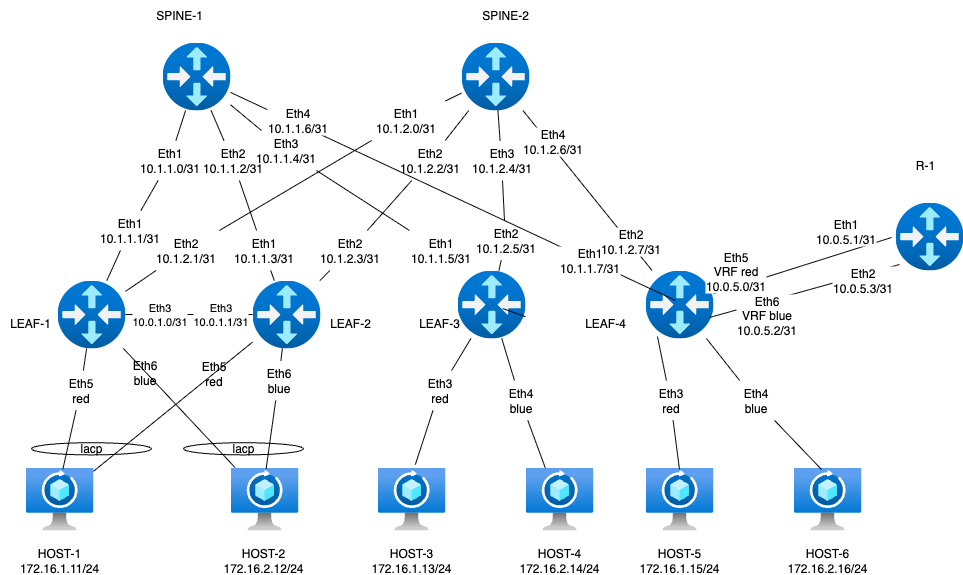
We’re keeping Arista EOS as the Leaf platform so we can retain a portion of the MLAG setup between leaf-1 and leaf-2. leaf-4 will act as the border leaf, and FRR will be used as the external router. For client devices, we’ll stick with Linux hosts using bonded interfaces.
The lab is built using the following role-based device mapping host- linux, leaf - arista, spine - arista
### **Underlay IP Address Allocation**
• Underlay addressing follows the format 10.x.y.z, where:
◦ x = Data Center ID
◦ y = Spine switch ID
◦ z = Sequential host address per leaf connection
• Host addressing uses the 172.16.x.z/24 format, where:
◦ x = Leaf switch ID
◦ z = Sequential host address
◦ Each leaf switch uses .1 as its own IP in the corresponding subnet
• Loopback addressing uses 192.168.a.b/32, where:
◦ a = 1 for spine switches
◦ a = 2 for leaf switches
◦ b = Spine or leaf ID (assigned sequentially)
• IPv6 addressing uses fd00::\[IPv4]
Interconnect ipv4 ipv6
| Device A | Interface A | IPv4 A | IPv6 A | Device B | Interface B | IPv4 B | IPv6 B |
| -------- | ------------- | -------------- | --------------------- | -------- | ----------- | ---------------- | ------------------ |
| Spine-1 | Eth1 | 10.1.1.0/31 | fd00::10:1:1:0/127 | Leaf-1 | Eth1 | 10.1.1.1/31 | fd00::10:1:1:1/127 |
| Spine-1 | Eth2 | 10.1.1.2/31 | fd00::10:1:1:2/127 | Leaf-2 | Eth1 | 10.1.1.3/31 | fd00::10:1:1:3/127 |
| Spine-1 | Eth3 | 10.1.1.4/31 | fd00::10:1:1:4/127 | Leaf-3 | Eth1 | 10.1.1.5/31 | fd00::10:1:1:5/127 |
| Spine-1 | Eth4 | 10.1.1.6/31 | fd00::10:1:1:6/127 | Leaf-4 | Eth1 | 10.1.1.7/31 | fd00::10:1:1:7/127 |
| Spine-2 | Eth1 | 10.1.2.0/31 | fd00::10:1:2:0/127 | Leaf-1 | Eth2 | 10.1.2.1/31 | fd00::10:1:2:1/127 |
| Spine-2 | Eth2 | 10.1.2.2/31 | fd00::10:1:2:2/127 | Leaf-2 | Eth2 | 10.1.2.3/31 | fd00::10:1:2:3/127 |
| Spine-2 | Eth3 | 10.1.2.4/31 | fd00::10:1:2:4/127 | Leaf-3 | Eth2 | 10.1.2.5/31 | fd00::10:1:2:5/127 |
| Spine-2 | Eth4 | 10.1.2.6/31 | fd00::10:1:2:6/127 | Leaf-4 | Eth2 | 10.1.2.7/31 | fd00::10:1:2:7/127 |
| Leaf-1 | Eth3 | 10.0.1.0/31 | fd00::10:0:1:0/127 | Leaf-2 | Eth3 | 10.0.1.1/31 | fd00::10:0:1:1/127 |
| Leaf-1 | Eth4 | ------------ | ------------ | Leaf-2 | Eth4 | ------------ | ------------ |
| Leaf-4 | Eth5 vrf-red | 10.0.5.0/31 | fd00::10:0:5:0/127 | R-1 | Eth1 | 10.0.5.1/31 | fd00::10:0:5:1/127 |
| Leaf-4 | Eth6 vrf-blue | 10.0.5.2/31 | fd00::10:0:5:2/127 | R-1 | Eth2 | 10.0.5.3/31 | fd00::10:0:5:3/127 |
| Host-1 | Eth1 | 172.16.1.11/24 | fd00::172:16:1:b/116 | Leaf-1 | Eth5 | access vlan red | access vlan red |
| Host-1 | Eth2 | 172.16.1.11/24 | fd00::172:16:1:b/116 | Leaf-2 | Eth5 | access vlan red | access vlan red |
| Host-2 | Eth1 | 172.16.1.12/24 | fd00::172:16:1:c/116 | Leaf-1 | Eth6 | access vlan blue | access vlan blue |
| Host-2 | Eth2 | 172.16.1.12/24 | fd00::172:16:1:с/116 | Leaf-2 | Eth6 | access vlan blue | access vlan blue |
| Host-3 | Eth1 | 172.16.2.13/24 | fd00::172:16:2:d/116 | Leaf-3 | Eth3 | access vlan red | access vlan red |
| Host-4 | Eth1 | 172.16.2.14/24 | fd00::172:16:2:e/116 | Leaf-3 | Eth4 | access vlan blue | access vlan blue |
| Host-5 | Eth1 | 172.16.2.15/24 | fd00::172:16:2:f/116 | Leaf-4 | Eth3 | access vlan red | access vlan red |
| Host-6 | Eth1 | 172.16.2.16/24 | fd00::172:16:2:10/116 | Leaf-4 | Eth4 | access vlan blue | access vlan blue |
loopback
| Device | Loopback ipv4 | loopback ipv6 |
| ------- | ------------- | ----------------- |
| Spine-1 | 192.168.1.1 | fd00::192:168:1:1 |
| Spine-2 | 192.168.1.2 | fd00::192:168:1:2 |
| Leaf-1 | 192.168.2.1 | fd00::192:168:2:1 |
| Leaf-2 | 192.168.2.2 | fd00::192:168:2:2 |
| Leaf-1 | 192.168.2.0 | fd00::192:168:2:0 |
| Leaf-2 | 192.168.2.0 | fd00::192:168:2:0 |
| Leaf-3 | 192.168.2.3 | fd00::192:168:2:3 |
| Leaf-4 | 192.168.2.4 | fd00::192:168:2:4 |
| R-1 | 192.168.3.1 | fd00::192:168:3:1 |
Network based on ospf(underlay)+ibgp(overlay). Area ospf 0, bgp as 65500, external bgp as 65100
### **Launching a lab in the Netlab** (l2 mode)
Since the assignment requires careful reading, we ended up building two lab topologies during execution. The first attempt was based on Layer 2, and host-to-host routing worked as expected.
r1 was deployed using a router-on-a-stick design — a classic setup where a single physical interface handles multiple VLANs via subinterfaces. Diagram bellow
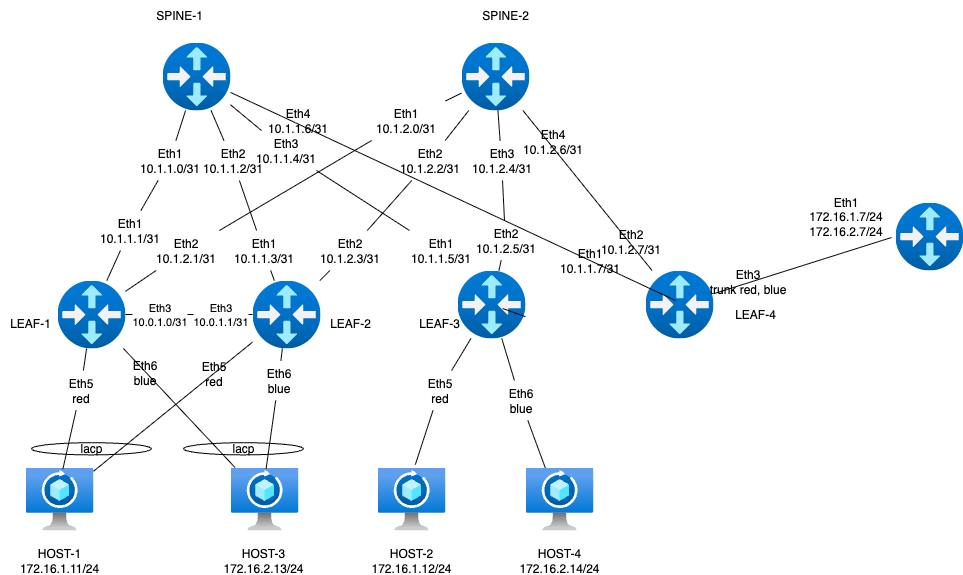 File [Topology](https://github.com/aeangel/otus-DC-net/blob/main/lab08/l2_topology.yml) For quick reference, here’s the inline listing:
topology.yml
```yml
---
provider: clab
module: [ vlan,vxlan,ospf,bgp,evpn,bfd,lag ]
plugin: [ bgp.session ]
#bgp
bgp.bfd: True
bgp:
as: 65500
rr_list: [ s1,s2 ]
rr_mesh: False
tools:
edgeshark:
graphite:
nodes:
s1:
device: eos
id: 1
loopback:
ipv4: 192.168.1.1/32
ipv6: fd00::192:168:1:1/128
s2:
device: eos
id: 2
loopback:
ipv4: 192.168.1.2/32
ipv6: fd00::192:168:1:2/128
l1:
device: eos
id: 3
loopback:
ipv4: 192.168.2.1/32
ipv6: fd00::192:168:2:1/128
l2:
device: eos
id: 4
loopback:
ipv4: 192.168.2.2/32
ipv6: fd00::192:168:2:2/128
l3:
device: eos
id: 5
loopback:
ipv4: 192.168.2.3/32
ipv6: fd00::192:168:2:3/128
l4:
device: eos
id: 6
loopback:
ipv4: 192.168.2.4/32
ipv6: fd00::192:168:2:4/128
r1:
module: [ vrf,vlan ]
device: frr
id: 7
vlan.mode: route
h1:
id: 11
module: [ lag ]
device: linux
h2:
id: 12
module: [ lag ]
device: linux
h3:
id: 13
device: linux
h4:
id: 14
device: linux
#vrf route leacking
vrfs:
red:
import: [ red, blue ]
blue:
import: [ red, blue ]
#vlan
vlans:
red:
mode: bridge
vrf: red
prefix:
ipv4: 172.16.1.0/24
ipv6: fd00::172:16:1:0/116
blue:
mode: bridge
vrf: blue
prefix:
ipv4: 172.16.2.0/24
ipv6: fd00::172:16:2:0/116
links:
#spine1-leaf1,2,3,4
- interfaces:
- node: s1
ifname: eth1
ipv4: 10.1.1.0
ipv6: fd00::10:1:1:0
ospf:
password: 'spine1'
bfd: true
- node: l1
ifname: eth1
ipv4: 10.1.1.1
ipv6: fd00::10:1:1:1
ospf:
password: 'spine1'
bfd: true
prefix:
ipv4: 10.1.1.0/31
ipv6: fd00::10:1:1:0/127
- interfaces:
- node: s1
ifname: eth2
ipv4: 10.1.1.2
ipv6: fd00::10:1:1:2
ospf:
password: 'spine1'
bfd: true
- node: l2
ifname: eth1
ipv4: 10.1.1.3
ipv6: fd00::10:1:1:3
ospf:
password: 'spine1'
bfd: true
prefix:
ipv4: 10.1.1.2/31
ipv6: fd00::10:1:1:2/127
- interfaces:
- node: s1
ifname: eth3
ipv4: 10.1.1.4
ipv6: fd00::10:1:1:4
ospf:
password: 'spine1'
bfd: true
- node: l3
ifname: eth1
ipv4: 10.1.1.5
ipv6: fd00::10:1:1:5
ospf:
password: 'spine1'
bfd: true
prefix:
ipv4: 10.1.1.4/31
ipv6: fd00::10:1:1:4/127
- interfaces:
- node: s1
ifname: eth4
ipv4: 10.1.1.6
ipv6: fd00::10:1:1:6
ospf:
password: 'spine1'
bfd: true
- node: l4
ifname: eth1
ipv4: 10.1.1.7
ipv6: fd00::10:1:1:7
ospf:
password: 'spine1'
bfd: true
prefix:
ipv4: 10.1.1.6/31
ipv6: fd00::10:1:1:6/127
#spine2-leaf1,2,3,4
- interfaces:
- node: s2
ifname: eth1
ipv4: 10.1.2.0
ipv6: fd00::10:1:2:0
ospf:
password: 'spine2'
bfd: true
- node: l1
ifname: eth2
ipv4: 10.1.2.1
ipv6: fd00::10:1:2:1
ospf:
password: 'spine2'
bfd: true
prefix:
ipv4: 10.1.2.0/31
ipv6: fd00::10:1:2:0/127
- interfaces:
- node: s2
ifname: eth2
ipv4: 10.1.2.2
ipv6: fd00::10:1:2:2
ospf:
password: 'spine2'
bfd: true
- node: l2
ifname: eth2
ipv4: 10.1.2.3
ipv6: fd00::10:1:2:3
ospf:
password: 'spine2'
bfd: true
prefix:
ipv4: 10.1.2.2/31
ipv6: fd00::10:1:2:2/127
- interfaces:
- node: s2
ifname: eth3
ipv4: 10.1.2.4
ipv6: fd00::10:1:2:4
ospf:
password: 'spine2'
bfd: true
- node: l3
ifname: eth2
ipv4: 10.1.2.5
ipv6: fd00::10:1:2:5
ospf:
password: 'spine2'
bfd: true
prefix:
ipv4: 10.1.2.4/31
ipv6: fd00::10:1:2:4/127
- interfaces:
- node: s2
ifname: eth4
ipv4: 10.1.2.6
ipv6: fd00::10:1:2:6
ospf:
password: 'spine2'
bfd: true
- node: l4
ifname: eth2
ipv4: 10.1.2.7
ipv6: fd00::10:1:2:7
ospf:
password: 'spine2'
bfd: true
prefix:
ipv4: 10.1.2.6/31
ipv6: fd00::10:1:2:6/127
#l1-l2
- interfaces:
- node: l1
ifname: eth3
ipv4: 10.0.1.0
ipv6: fd00::10:0:1:0
ospf:
password: 'lag1'
bfd: true
- node: l2
ifname: eth3
ipv4: 10.0.1.1
ipv6: fd00::10:0:1:1
ospf:
password: 'lag1'
bfd: true
prefix:
ipv4: 10.0.1.0/31
ipv6: fd00::10:0:1:0/127
#downlink + mlag leaf-1 leaf-2
- lag:
members: [l1-l2]
mlag.peergroup: 1
- lag:
members: [h1-l1, h1-l2]
vlan.access: red
- lag:
members: [h2-l1, h2-l2]
vlan.access: blue
#downlink leaf-3
#host3
- interfaces:
- node: h3
ifname: eth1
- node: l3
ifname: eth3
vlan.access: red
#host4
- interfaces:
- node: h4
ifname: eth1
- node: l3
ifname: eth4
vlan.access: blue
#router on stick, leaf-4 is border leaf
- l4:
r1:
vlan.trunk: [ red, blue ]
validate:
wait:
description: Waiting for stabilize
wait: 45
ping1:
description: Pinging H2 from H1
nodes: [ h1 ]
devices: [ linux ]
exec: ping -c 10 h2 -A
valid: |
"64 bytes" in stdout
ping2:
description: Pinging H4 from H3
nodes: [ h3 ]
devices: [ linux ]
exec: ping -c 10 h4 -A
valid: |
"64 bytes" in stdout
ping3:
description: Pinging ipv6 H1 from H2
nodes: [ h2 ]
devices: [ linux ]
exec: ping6 -c 10 h1 -A
valid: |
"64 bytes" in stdout
ping4:
description: Pinging ipv6 H3 from H4
nodes: [ h4 ]
devices: [ linux ]
exec: ping6 -c 10 h3 -A
valid: |
"64 bytes" in stdout
```
And it worked fine. The only concern was the absence of EVPN Type-5 routes — but of course, there was no reason for them to appear: None of the Leaf switches were involved in inter-VRF routing, and in fact, they had no awareness of the VRFs at all. Realizing the design was off, I went back and started building it the right way.
### **Launching a lab in the Netlab** (l3 mode)
Correct topology for the assignment. We decided to implement a distributed gateway architecture, where each VRF domain has its own gateway on every leaf switch. Some nuances emerged during route exchange between leaf-4 and r-1, particularly across VRFs — but we’ll cover that later. The hard-earned [configuration file](https://github.com/aeangel/otus-DC-net/blob/main/lab08/topology.yml) is available below the diagram.

topology.yml
```yml
---
provider: clab
module: [ vlan,vxlan,ospf,bgp,evpn,bfd,lag,vrf,gateway ]
plugin: [ bgp.session ]
defaults.devices.eos.clab.image: "ceos:4.34.2F"
#bgp
bgp.bfd: True
bgp:
as: 65500
rr_list: [ s1,s2 ]
rr_mesh: False
tools:
edgeshark:
graphite:
groups:
mlag_leaf:
members: [ l1, l2 ]
config: [ share-loopback.j2 ]
router:
members: [ r1 ]
config: [ route-map.j2 ]
nodes:
s1:
device: eos
id: 1
loopback:
ipv4: 192.168.1.1/32
ipv6: fd00::192:168:1:1/128
s2:
device: eos
id: 2
loopback:
ipv4: 192.168.1.2/32
ipv6: fd00::192:168:1:2/128
l1:
device: eos
id: 3
loopback:
ipv4: 192.168.2.1/32
ipv6: fd00::192:168:2:1/128
l2:
device: eos
id: 4
loopback:
ipv4: 192.168.2.2/32
ipv6: fd00::192:168:2:2/128
l3:
device: eos
id: 5
loopback:
ipv4: 192.168.2.3/32
ipv6: fd00::192:168:2:3/128
l4:
device: eos
id: 6
loopback:
ipv4: 192.168.2.4/32
ipv6: fd00::192:168:2:4/128
r1:
module: [ bgp ]
device: frr
bgp.as: 65100
bgp.default_originate: True
id: 7
loopback:
ipv4: 192.168.3.1/32
ipv6: fd00::192:168:3:1/128
h1:
id: 11
module: [ lag ]
device: linux
h2:
id: 12
module: [ lag ]
device: linux
h3:
id: 13
device: linux
h4:
id: 14
device: linux
h5:
id: 15
device: linux
h6:
id: 16
device: linux
#vrf
vrfs:
red:
ospf: False
bgp:
evpn.transit_vni: 10000
# links: [ r1-l4 ]
blue:
ospf: False
bgp:
evpn.transit_vni: 10001
# links: [ r1-l4 ]
#vlan
vlans:
red:
gateway: True
vrf: red
prefix:
ipv4: 172.16.1.0/24
ipv6: fd00::172:16:1:0/116
blue:
gateway: True
vrf: blue
prefix:
ipv4: 172.16.2.0/24
ipv6: fd00::172:16:2:0/116
links:
#spine1-leaf1,2,3,4
- interfaces:
- node: s1
ifname: eth1
ipv4: 10.1.1.0
ipv6: fd00::10:1:1:0
ospf:
password: 'spine1'
bfd: true
- node: l1
ifname: eth1
ipv4: 10.1.1.1
ipv6: fd00::10:1:1:1
ospf:
password: 'spine1'
bfd: true
prefix:
ipv4: 10.1.1.0/31
ipv6: fd00::10:1:1:0/127
- interfaces:
- node: s1
ifname: eth2
ipv4: 10.1.1.2
ipv6: fd00::10:1:1:2
ospf:
password: 'spine1'
bfd: true
- node: l2
ifname: eth1
ipv4: 10.1.1.3
ipv6: fd00::10:1:1:3
ospf:
password: 'spine1'
bfd: true
prefix:
ipv4: 10.1.1.2/31
ipv6: fd00::10:1:1:2/127
- interfaces:
- node: s1
ifname: eth3
ipv4: 10.1.1.4
ipv6: fd00::10:1:1:4
ospf:
password: 'spine1'
bfd: true
- node: l3
ifname: eth1
ipv4: 10.1.1.5
ipv6: fd00::10:1:1:5
ospf:
password: 'spine1'
bfd: true
prefix:
ipv4: 10.1.1.4/31
ipv6: fd00::10:1:1:4/127
- interfaces:
- node: s1
ifname: eth4
ipv4: 10.1.1.6
ipv6: fd00::10:1:1:6
ospf:
password: 'spine1'
bfd: true
- node: l4
ifname: eth1
ipv4: 10.1.1.7
ipv6: fd00::10:1:1:7
ospf:
password: 'spine1'
bfd: true
prefix:
ipv4: 10.1.1.6/31
ipv6: fd00::10:1:1:6/127
#spine2-leaf1,2,3,4
- interfaces:
- node: s2
ifname: eth1
ipv4: 10.1.2.0
ipv6: fd00::10:1:2:0
ospf:
password: 'spine2'
bfd: true
- node: l1
ifname: eth2
ipv4: 10.1.2.1
ipv6: fd00::10:1:2:1
ospf:
password: 'spine2'
bfd: true
prefix:
ipv4: 10.1.2.0/31
ipv6: fd00::10:1:2:0/127
- interfaces:
- node: s2
ifname: eth2
ipv4: 10.1.2.2
ipv6: fd00::10:1:2:2
ospf:
password: 'spine2'
bfd: true
- node: l2
ifname: eth2
ipv4: 10.1.2.3
ipv6: fd00::10:1:2:3
ospf:
password: 'spine2'
bfd: true
prefix:
ipv4: 10.1.2.2/31
ipv6: fd00::10:1:2:2/127
- interfaces:
- node: s2
ifname: eth3
ipv4: 10.1.2.4
ipv6: fd00::10:1:2:4
ospf:
password: 'spine2'
bfd: true
- node: l3
ifname: eth2
ipv4: 10.1.2.5
ipv6: fd00::10:1:2:5
ospf:
password: 'spine2'
bfd: true
prefix:
ipv4: 10.1.2.4/31
ipv6: fd00::10:1:2:4/127
- interfaces:
- node: s2
ifname: eth4
ipv4: 10.1.2.6
ipv6: fd00::10:1:2:6
ospf:
password: 'spine2'
bfd: true
- node: l4
ifname: eth2
ipv4: 10.1.2.7
ipv6: fd00::10:1:2:7
ospf:
password: 'spine2'
bfd: true
prefix:
ipv4: 10.1.2.6/31
ipv6: fd00::10:1:2:6/127
#l1-l2
- interfaces:
- node: l1
ifname: eth3
ipv4: 10.0.1.0
ipv6: fd00::10:0:1:0
ospf:
password: 'lag1'
bfd: true
- node: l2
ifname: eth3
ipv4: 10.0.1.1
ipv6: fd00::10:0:1:1
ospf:
password: 'lag1'
bfd: true
prefix:
ipv4: 10.0.1.0/31
ipv6: fd00::10:0:1:0/127
#downlink + mlag leaf-1 leaf-2
- lag:
members: [l1-l2]
mlag.peergroup: 1
- lag:
members: [h1-l1, h1-l2]
vlan.access: red
- lag:
members: [h2-l1, h2-l2]
vlan.access: blue
#downlink leaf-3
#host3
- interfaces:
- node: h3
ifname: eth1
- node: l3
ifname: eth3
vlan.access: red
#host4
- interfaces:
- node: h4
ifname: eth1
- node: l3
ifname: eth4
vlan.access: blue
#downlink leaf-4
#host5
- interfaces:
- node: h5
ifname: eth1
- node: l4
ifname: eth3
vlan.access: red
#host6
- interfaces:
- node: h6
ifname: eth1
- node: l4
ifname: eth4
vlan.access: blue
#leaf-4 as border leaf to r1
# - l4-r1
- interfaces:
- node: l4
vrf: red
ifname: eth5
ipv4: 10.0.5.0
ipv6: fd00::10:0:5:0
- node: r1
ifname: eth1
ipv4: 10.0.5.1
ipv6: fd00::10:0:5:1
prefix:
ipv4: 10.0.5.0/31
ipv6: fd00::10:0:5:0/127
# - l4-r1
- interfaces:
- node: l4
vrf: blue
ifname: eth6
ipv4: 10.0.5.2
ipv6: fd00::10:0:5:2
- node: r1
ifname: eth2
ipv4: 10.0.5.3
ipv6: fd00::10:0:5:3
prefix:
ipv4: 10.0.5.2/31
ipv6: fd00::10:0:5:2/127
validate:
wait:
description: Waiting for stabilize
wait: 45
ping1:
description: Pinging H2 from H1
nodes: [ h1 ]
devices: [ linux ]
exec: ping -c 10 h2 -A
valid: |
"64 bytes" in stdout
ping2:
description: Pinging H4 from H3
nodes: [ h3 ]
devices: [ linux ]
exec: ping -c 10 h4 -A
valid: |
"64 bytes" in stdout
ping3:
description: Pinging ipv6 H1 from H2
nodes: [ h2 ]
devices: [ linux ]
exec: ping6 -c 10 h1 -A
valid: |
"64 bytes" in stdout
ping4:
description: Pinging ipv6 H3 from H4
nodes: [ h4 ]
devices: [ linux ]
exec: ping6 -c 10 h3 -A
valid: |
"64 bytes" in stdout
```
### **Validating**
Connectivity is verified using the Netlab validate autotest. If everything is configured correctly, all endpoints will successfully respond to ping tests.
netlab validate
```txt
[wait] Waiting for stabilize
[ping1] Pinging H2 from H1 [ node(s): h1 ]
[PASS] Validation succeeded on h1
[PASS] Test succeeded in 0.1 seconds
[ping2] Pinging H4 from H3 [ node(s): h3 ]
[PASS] Validation succeeded on h3
[PASS] Test succeeded in 0.1 seconds
[ping3] Pinging ipv6 H1 from H2 [ node(s): h2 ]
[PASS] Validation succeeded on h2
[PASS] Test succeeded in 0.1 seconds
[ping4] Pinging ipv6 H3 from H4 [ node(s): h4 ]
[PASS] Validation succeeded on h4
[PASS] Test succeeded in 0.1 seconds
[SUCCESS] Tests passed: 4
```
Now let’s talk about the nuances of route exchange through R-1. If you simply launch the lab, both VRFs will receive the loopback route from R-1, and R-1 will have visibility into all networks. However, the VRFs won’t see each other’s routes, because they share the same BGP AS number — and by default, BGP does not install routes received via eBGP that originate from its own AS.
We explored several options to resolve this:
• bgp allowas-in on the peer — allows the router to accept routes from its own AS.
Oddly, this didn’t work on Arista, though it did on FRR. Possibly a missed config detail.
• route-map that strips the BGP AS from routes received from leaf-4 — this worked perfectly.
• creating separate VRFs on R-1 and linking them via another IGP protocol — effectively removes BGP attributes, but adds complexity.
Functionally similar to the route-map approach, but more convoluted.
• default-originate — surprisingly effective and simple, though it didn’t come to mind immediately.
The result resembles hierarchical VPN (HVPN) in Huawei’s terminology.
• bgp override-as — again, didn’t work on Arista, but FRR accepted it.
• Using different AS numbers for each VRF — technically valid, but conventionally, VRFs tend to share the AS of the router they reside on. I briefly considered running leaf-4 on FRR while keeping the rest of the fabric on Arista — but VXLAN VNI mappings started behaving inconsistently. Spent a lot of time trying to stitch it all together, but ultimately decided against submitting the lab with such workarounds.
Now, let’s talk about how to make everything work cleanly and reliably.
Initially, I went with the default route advertisement approach — it worked well in Netlab. Just a single line: `bgp.default_originate: True,` and the default route is advertised in the session. However, I later discovered issues with MLAG behavior on leaf-1 and leaf-2 — specifically, duplicate packets appearing in ping results. The root cause: both leaf-1 and leaf-2, as part of the same fabric, must send BGP updates from the same source address. To achieve this, they need to have a loopback interface with the same IP address configured on both devices. Since the overarching goal of this lab series is to avoid using configure terminal manually, we need to inject this configuration during device initialization.
Ideally, I’d write a custom Netlab module to handle this — but due to time constraints, I opted for a shortcut: Using the config option in the topology file, which allows injecting additional configuration snippets after the lab is initialized. And since we’re already adding custom [config for leaf-1 and leaf-2](https://github.com/aeangel/otus-DC-net/blob/main/lab08/share-loopback.j2), we can also include the [route-map configuration for R-1](https://github.com/aeangel/otus-DC-net/blob/main/lab08/route-map.j2) at the same time.
Important note: For some reason, I had the idea that the same VNI could be used for both L2 and L3 services — but in practice, that’s not the case at all. This misconception led to a lot of wasted time trying to trace routes that simply wouldn’t propagate.
Now, let’s take a look at the routing tables.
spine-2 show evpn
```
s2#show bgp evpn vni 101000
BGP routing table information for VRF default
Router identifier 192.168.1.2, local AS number 65500
Route status codes: * - valid, > - active, S - Stale, E - ECMP head, e - ECMP
c - Contributing to ECMP, % - Pending best path selection
Origin codes: i - IGP, e - EGP, ? - incomplete
AS Path Attributes: Or-ID - Originator ID, C-LST - Cluster List, LL Nexthop - Link Local Nexthop
Network Next Hop Metric LocPref Weight Path
* >Ec RD: 192.168.2.3:1000 mac-ip aac1.ab76.bfe4
192.168.2.3 - 100 0 i
* ec RD: 192.168.2.3:1000 mac-ip aac1.ab76.bfe4
192.168.2.3 - 100 0 i
* >Ec RD: 192.168.2.3:1000 mac-ip aac1.ab76.bfe4 172.16.1.13
192.168.2.3 - 100 0 i
* ec RD: 192.168.2.3:1000 mac-ip aac1.ab76.bfe4 172.16.1.13
192.168.2.3 - 100 0 i
* >Ec RD: 192.168.2.1:1000 mac-ip aac1.abc9.29be
192.168.2.0 - 100 0 i
* ec RD: 192.168.2.1:1000 mac-ip aac1.abc9.29be
192.168.2.0 - 100 0 i
* >Ec RD: 192.168.2.2:1000 mac-ip aac1.abc9.29be
192.168.2.0 - 100 0 i
* ec RD: 192.168.2.2:1000 mac-ip aac1.abc9.29be
192.168.2.0 - 100 0 i
* >Ec RD: 192.168.2.1:1000 mac-ip aac1.abc9.29be 172.16.1.11
192.168.2.0 - 100 0 i
* ec RD: 192.168.2.1:1000 mac-ip aac1.abc9.29be 172.16.1.11
192.168.2.0 - 100 0 i
* >Ec RD: 192.168.2.2:1000 mac-ip aac1.abc9.29be 172.16.1.11
192.168.2.0 - 100 0 i
* ec RD: 192.168.2.2:1000 mac-ip aac1.abc9.29be 172.16.1.11
192.168.2.0 - 100 0 i
* >Ec RD: 192.168.2.4:1000 mac-ip aac1.abcd.b350
192.168.2.4 - 100 0 i
* ec RD: 192.168.2.4:1000 mac-ip aac1.abcd.b350
192.168.2.4 - 100 0 i
* >Ec RD: 192.168.2.1:1000 imet 192.168.2.0
192.168.2.0 - 100 0 i
* ec RD: 192.168.2.1:1000 imet 192.168.2.0
192.168.2.0 - 100 0 i
* >Ec RD: 192.168.2.2:1000 imet 192.168.2.0
192.168.2.0 - 100 0 i
* ec RD: 192.168.2.2:1000 imet 192.168.2.0
192.168.2.0 - 100 0 i
* >Ec RD: 192.168.2.3:1000 imet 192.168.2.3
192.168.2.3 - 100 0 i
* ec RD: 192.168.2.3:1000 imet 192.168.2.3
192.168.2.3 - 100 0 i
* >Ec RD: 192.168.2.4:1000 imet 192.168.2.4
192.168.2.4 - 100 0 i
* ec RD: 192.168.2.4:1000 imet 192.168.2.4
192.168.2.4 - 100 0 i
s2#show bgp evpn vni 101001
BGP routing table information for VRF default
Router identifier 192.168.1.2, local AS number 65500
Route status codes: * - valid, > - active, S - Stale, E - ECMP head, e - ECMP
c - Contributing to ECMP, % - Pending best path selection
Origin codes: i - IGP, e - EGP, ? - incomplete
AS Path Attributes: Or-ID - Originator ID, C-LST - Cluster List, LL Nexthop - Link Local Nexthop
Network Next Hop Metric LocPref Weight Path
* >Ec RD: 192.168.2.3:1001 mac-ip aac1.abdb.190f
192.168.2.3 - 100 0 i
* ec RD: 192.168.2.3:1001 mac-ip aac1.abdb.190f
192.168.2.3 - 100 0 i
* >Ec RD: 192.168.2.3:1001 mac-ip aac1.abdb.190f 172.16.2.14
192.168.2.3 - 100 0 i
* ec RD: 192.168.2.3:1001 mac-ip aac1.abdb.190f 172.16.2.14
192.168.2.3 - 100 0 i
* >Ec RD: 192.168.2.1:1001 mac-ip aac1.abe2.5f8d
192.168.2.0 - 100 0 i
* ec RD: 192.168.2.1:1001 mac-ip aac1.abe2.5f8d
192.168.2.0 - 100 0 i
* >Ec RD: 192.168.2.2:1001 mac-ip aac1.abe2.5f8d
192.168.2.0 - 100 0 i
* ec RD: 192.168.2.2:1001 mac-ip aac1.abe2.5f8d
192.168.2.0 - 100 0 i
* >Ec RD: 192.168.2.1:1001 mac-ip aac1.abe2.5f8d 172.16.2.12
192.168.2.0 - 100 0 i
* ec RD: 192.168.2.1:1001 mac-ip aac1.abe2.5f8d 172.16.2.12
192.168.2.0 - 100 0 i
* >Ec RD: 192.168.2.2:1001 mac-ip aac1.abe2.5f8d 172.16.2.12
192.168.2.0 - 100 0 i
* ec RD: 192.168.2.2:1001 mac-ip aac1.abe2.5f8d 172.16.2.12
192.168.2.0 - 100 0 i
* >Ec RD: 192.168.2.1:1001 imet 192.168.2.0
192.168.2.0 - 100 0 i
* ec RD: 192.168.2.1:1001 imet 192.168.2.0
192.168.2.0 - 100 0 i
* >Ec RD: 192.168.2.2:1001 imet 192.168.2.0
192.168.2.0 - 100 0 i
* ec RD: 192.168.2.2:1001 imet 192.168.2.0
192.168.2.0 - 100 0 i
* >Ec RD: 192.168.2.3:1001 imet 192.168.2.3
192.168.2.3 - 100 0 i
* ec RD: 192.168.2.3:1001 imet 192.168.2.3
192.168.2.3 - 100 0 i
* >Ec RD: 192.168.2.4:1001 imet 192.168.2.4
192.168.2.4 - 100 0 i
* ec RD: 192.168.2.4:1001 imet 192.168.2.4
192.168.2.4 - 100 0 i
####route-5
show bgp evpn vni 10000
BGP routing table information for VRF default
Router identifier 192.168.1.2, local AS number 65500
Route status codes: * - valid, > - active, S - Stale, E - ECMP head, e - ECMP
c - Contributing to ECMP, % - Pending best path selection
Origin codes: i - IGP, e - EGP, ? - incomplete
AS Path Attributes: Or-ID - Originator ID, C-LST - Cluster List, LL Nexthop - Link Local Nexthop
Network Next Hop Metric LocPref Weight Path
* >Ec RD: 192.168.2.1:1000 mac-ip aac1.abc9.29be 172.16.1.11
192.168.2.0 - 100 0 i
* ec RD: 192.168.2.1:1000 mac-ip aac1.abc9.29be 172.16.1.11
192.168.2.0 - 100 0 i
* >Ec RD: 192.168.2.2:1000 mac-ip aac1.abc9.29be 172.16.1.11
192.168.2.0 - 100 0 i
* ec RD: 192.168.2.2:1000 mac-ip aac1.abc9.29be 172.16.1.11
192.168.2.0 - 100 0 i
* > RD: 65500:1 ip-prefix 0.0.0.0/0
192.168.2.4 0 100 0 65100 i
* RD: 65500:1 ip-prefix 0.0.0.0/0
192.168.2.4 0 100 0 65100 i
* > RD: 65500:1 ip-prefix 10.0.5.0/31
192.168.2.4 - 100 0 i
* RD: 65500:1 ip-prefix 10.0.5.0/31
192.168.2.4 - 100 0 i
* > RD: 65500:1 ip-prefix 172.16.1.0/24
192.168.2.0 - 100 0 i
* RD: 65500:1 ip-prefix 172.16.1.0/24
192.168.2.0 - 100 0 i
* RD: 65500:1 ip-prefix 172.16.1.0/24
192.168.2.0 - 100 0 i
* RD: 65500:1 ip-prefix 172.16.1.0/24
192.168.2.0 - 100 0 i
* RD: 65500:1 ip-prefix 172.16.1.0/24
192.168.2.3 - 100 0 i
* RD: 65500:1 ip-prefix 172.16.1.0/24
192.168.2.3 - 100 0 i
* RD: 65500:1 ip-prefix 172.16.1.0/24
192.168.2.4 - 100 0 i
* RD: 65500:1 ip-prefix 172.16.1.0/24
192.168.2.4 - 100 0 i
* > RD: 65500:1 ip-prefix 172.16.2.0/24
192.168.2.4 - 100 0 65100 i
* RD: 65500:1 ip-prefix 172.16.2.0/24
192.168.2.4 - 100 0 65100 i
* > RD: 65500:1 ip-prefix ::/0
192.168.2.4 0 100 0 65100 i
* RD: 65500:1 ip-prefix ::/0
192.168.2.4 0 100 0 65100 i
* > RD: 65500:1 ip-prefix fd00::10:0:5:0/127
192.168.2.4 - 100 0 i
* RD: 65500:1 ip-prefix fd00::10:0:5:0/127
192.168.2.4 - 100 0 i
* > RD: 65500:1 ip-prefix fd00::172:16:1:0/116
192.168.2.0 - 100 0 i
* RD: 65500:1 ip-prefix fd00::172:16:1:0/116
192.168.2.0 - 100 0 i
* RD: 65500:1 ip-prefix fd00::172:16:1:0/116
192.168.2.0 - 100 0 i
* RD: 65500:1 ip-prefix fd00::172:16:1:0/116
192.168.2.0 - 100 0 i
* RD: 65500:1 ip-prefix fd00::172:16:1:0/116
192.168.2.3 - 100 0 i
* RD: 65500:1 ip-prefix fd00::172:16:1:0/116
192.168.2.3 - 100 0 i
* RD: 65500:1 ip-prefix fd00::172:16:1:0/116
192.168.2.4 - 100 0 i
* RD: 65500:1 ip-prefix fd00::172:16:1:0/116
192.168.2.4 - 100 0 i
* > RD: 65500:1 ip-prefix fd00::172:16:2:0/116
192.168.2.4 - 100 0 65100 i
* RD: 65500:1 ip-prefix fd00::172:16:2:0/116
192.168.2.4 - 100 0 65100 i
show bgp evpn vni 10001
BGP routing table information for VRF default
Router identifier 192.168.1.2, local AS number 65500
Route status codes: * - valid, > - active, S - Stale, E - ECMP head, e - ECMP
c - Contributing to ECMP, % - Pending best path selection
Origin codes: i - IGP, e - EGP, ? - incomplete
AS Path Attributes: Or-ID - Originator ID, C-LST - Cluster List, LL Nexthop - Link Local Nexthop
Network Next Hop Metric LocPref Weight Path
* > RD: 65500:2 ip-prefix 0.0.0.0/0
192.168.2.4 0 100 0 65100 i
* RD: 65500:2 ip-prefix 0.0.0.0/0
192.168.2.4 0 100 0 65100 i
* > RD: 65500:2 ip-prefix 10.0.5.2/31
192.168.2.4 - 100 0 i
* RD: 65500:2 ip-prefix 10.0.5.2/31
192.168.2.4 - 100 0 i
* > RD: 65500:2 ip-prefix 172.16.1.0/24
192.168.2.4 - 100 0 65100 i
* RD: 65500:2 ip-prefix 172.16.1.0/24
192.168.2.4 - 100 0 65100 i
* > RD: 65500:2 ip-prefix 172.16.2.0/24
192.168.2.0 - 100 0 i
* RD: 65500:2 ip-prefix 172.16.2.0/24
192.168.2.0 - 100 0 i
* RD: 65500:2 ip-prefix 172.16.2.0/24
192.168.2.0 - 100 0 i
* RD: 65500:2 ip-prefix 172.16.2.0/24
192.168.2.0 - 100 0 i
* RD: 65500:2 ip-prefix 172.16.2.0/24
192.168.2.3 - 100 0 i
* RD: 65500:2 ip-prefix 172.16.2.0/24
192.168.2.3 - 100 0 i
* RD: 65500:2 ip-prefix 172.16.2.0/24
192.168.2.4 - 100 0 i
* RD: 65500:2 ip-prefix 172.16.2.0/24
192.168.2.4 - 100 0 i
* > RD: 65500:2 ip-prefix ::/0
192.168.2.4 0 100 0 65100 i
* RD: 65500:2 ip-prefix ::/0
192.168.2.4 0 100 0 65100 i
* > RD: 65500:2 ip-prefix fd00::10:0:5:2/127
192.168.2.4 - 100 0 i
* RD: 65500:2 ip-prefix fd00::10:0:5:2/127
192.168.2.4 - 100 0 i
* > RD: 65500:2 ip-prefix fd00::172:16:1:0/116
192.168.2.4 - 100 0 65100 i
* RD: 65500:2 ip-prefix fd00::172:16:1:0/116
192.168.2.4 - 100 0 65100 i
* > RD: 65500:2 ip-prefix fd00::172:16:2:0/116
192.168.2.0 - 100 0 i
* RD: 65500:2 ip-prefix fd00::172:16:2:0/116
192.168.2.0 - 100 0 i
* RD: 65500:2 ip-prefix fd00::172:16:2:0/116
192.168.2.0 - 100 0 i
* RD: 65500:2 ip-prefix fd00::172:16:2:0/116
192.168.2.0 - 100 0 i
* RD: 65500:2 ip-prefix fd00::172:16:2:0/116
192.168.2.3 - 100 0 i
* RD: 65500:2 ip-prefix fd00::172:16:2:0/116
192.168.2.3 - 100 0 i
* RD: 65500:2 ip-prefix fd00::172:16:2:0/116
192.168.2.4 - 100 0 i
* RD: 65500:2 ip-prefix fd00::172:16:2:0/116
192.168.2.4 - 100 0 i
```
Note that the routes received from the leaf-1 / leaf-2 pair are advertised with the source address 192.168.2.0/32, which is shared between both leaf switches.
vrf routing tables
l3 show ip(v6) route vrf all
```txt
VRF: blue
Source Codes:
C - connected, S - static, K - kernel,
O - OSPF, O IA - OSPF inter area, O E1 - OSPF external type 1,
O E2 - OSPF external type 2, O N1 - OSPF NSSA external type 1,
O N2 - OSPF NSSA external type2, O3 - OSPFv3,
O3 IA - OSPFv3 inter area, O3 E1 - OSPFv3 external type 1,
O3 E2 - OSPFv3 external type 2,
O3 N1 - OSPFv3 NSSA external type 1,
O3 N2 - OSPFv3 NSSA external type2, B - Other BGP Routes,
B I - iBGP, B E - eBGP, R - RIP, I L1 - IS-IS level 1,
I L2 - IS-IS level 2, A B - BGP Aggregate,
A O - OSPF Summary, NG - Nexthop Group Static Route,
V - VXLAN Control Service, M - Martian,
DH - DHCP client installed default route,
DP - Dynamic Policy Route, L - VRF Leaked,
G - gRIBI, RC - Route Cache Route,
CL - CBF Leaked Route
Gateway of last resort:
B I 0.0.0.0/0 [200/0]
via VTEP 192.168.2.4 VNI 10001 router-mac 00:1c:73:80:f9:c4 local-interface Vxlan1
B I 10.0.5.2/31 [200/0]
via VTEP 192.168.2.4 VNI 10001 router-mac 00:1c:73:80:f9:c4 local-interface Vxlan1
B I 172.16.1.0/24 [200/0]
via VTEP 192.168.2.4 VNI 10001 router-mac 00:1c:73:80:f9:c4 local-interface Vxlan1
C 172.16.2.0/24
directly connected, Vlan1001
VRF: red
Source Codes:
C - connected, S - static, K - kernel,
O - OSPF, O IA - OSPF inter area, O E1 - OSPF external type 1,
O E2 - OSPF external type 2, O N1 - OSPF NSSA external type 1,
O N2 - OSPF NSSA external type2, O3 - OSPFv3,
O3 IA - OSPFv3 inter area, O3 E1 - OSPFv3 external type 1,
O3 E2 - OSPFv3 external type 2,
O3 N1 - OSPFv3 NSSA external type 1,
O3 N2 - OSPFv3 NSSA external type2, B - Other BGP Routes,
B I - iBGP, B E - eBGP, R - RIP, I L1 - IS-IS level 1,
I L2 - IS-IS level 2, A B - BGP Aggregate,
A O - OSPF Summary, NG - Nexthop Group Static Route,
V - VXLAN Control Service, M - Martian,
DH - DHCP client installed default route,
DP - Dynamic Policy Route, L - VRF Leaked,
G - gRIBI, RC - Route Cache Route,
CL - CBF Leaked Route
Gateway of last resort:
B I 0.0.0.0/0 [200/0]
via VTEP 192.168.2.4 VNI 10000 router-mac 00:1c:73:80:f9:c4 local-interface Vxlan1
B I 10.0.5.0/31 [200/0]
via VTEP 192.168.2.4 VNI 10000 router-mac 00:1c:73:80:f9:c4 local-interface Vxlan1
C 172.16.1.0/24
directly connected, Vlan1000
B I 172.16.2.0/24 [200/0]
via VTEP 192.168.2.4 VNI 10000 router-mac 00:1c:73:80:f9:c4 local-interface Vxlan1
============IPv6===================
VRF: blue
Displaying 4 of 9 IPv6 routing table entries
Source Codes:
C - connected, S - static, K - kernel, O3 - OSPFv3,
O3 IA - OSPFv3 inter area, O3 E1 - OSPFv3 external type 1,
O3 E2 - OSPFv3 external type 2,
O3 N1 - OSPFv3 NSSA external type 1
O3 N2 - OSPFv3 NSSA external type2, B - Other BGP Routes,
A B - BGP Aggregate, R - RIP,
I L1 - IS-IS level 1, I L2 - IS-IS level 2, DH - DHCP,
NG - Nexthop Group Static Route, M - Martian,
DP - Dynamic Policy Route, L - VRF Leaked,
G - gRIBI, RC - Route Cache Route,
CL - CBF Leaked Route
B I fd00::10:0:5:2/127 [200/0]
via VTEP 192.168.2.4 VNI 10001 router-mac 00:1c:73:80:f9:c4 local-interface Vxlan1
B I fd00::172:16:1:0/116 [200/0]
via VTEP 192.168.2.4 VNI 10001 router-mac 00:1c:73:80:f9:c4 local-interface Vxlan1
C fd00::172:16:2:0/116 [0/0]
via Vlan1001, directly connected
B I ::/0 [200/0]
via VTEP 192.168.2.4 VNI 10001 router-mac 00:1c:73:80:f9:c4 local-interface Vxlan1
VRF: red
Displaying 4 of 9 IPv6 routing table entries
Source Codes:
C - connected, S - static, K - kernel, O3 - OSPFv3,
O3 IA - OSPFv3 inter area, O3 E1 - OSPFv3 external type 1,
O3 E2 - OSPFv3 external type 2,
O3 N1 - OSPFv3 NSSA external type 1
O3 N2 - OSPFv3 NSSA external type2, B - Other BGP Routes,
A B - BGP Aggregate, R - RIP,
I L1 - IS-IS level 1, I L2 - IS-IS level 2, DH - DHCP,
NG - Nexthop Group Static Route, M - Martian,
DP - Dynamic Policy Route, L - VRF Leaked,
G - gRIBI, RC - Route Cache Route,
CL - CBF Leaked Route
B I fd00::10:0:5:0/127 [200/0]
via VTEP 192.168.2.4 VNI 10000 router-mac 00:1c:73:80:f9:c4 local-interface Vxlan1
C fd00::172:16:1:0/116 [0/0]
via Vlan1000, directly connected
B I fd00::172:16:2:0/116 [200/0]
via VTEP 192.168.2.4 VNI 10000 router-mac 00:1c:73:80:f9:c4 local-interface Vxlan1
B I ::/0 [200/0]
via VTEP 192.168.2.4 VNI 10000 router-mac 00:1c:73:80:f9:c4 local-interface Vxlan1
```
The loopback from R-1 isn’t being received because it’s filtered out by the route-map.
Leaf-4 vrf routing table
l4 show ip(v6) route vrf all
```txt
VRF: blue
Source Codes:
C - connected, S - static, K - kernel,
O - OSPF, O IA - OSPF inter area, O E1 - OSPF external type 1,
O E2 - OSPF external type 2, O N1 - OSPF NSSA external type 1,
O N2 - OSPF NSSA external type2, O3 - OSPFv3,
O3 IA - OSPFv3 inter area, O3 E1 - OSPFv3 external type 1,
O3 E2 - OSPFv3 external type 2,
O3 N1 - OSPFv3 NSSA external type 1,
O3 N2 - OSPFv3 NSSA external type2, B - Other BGP Routes,
B I - iBGP, B E - eBGP, R - RIP, I L1 - IS-IS level 1,
I L2 - IS-IS level 2, A B - BGP Aggregate,
A O - OSPF Summary, NG - Nexthop Group Static Route,
V - VXLAN Control Service, M - Martian,
DH - DHCP client installed default route,
DP - Dynamic Policy Route, L - VRF Leaked,
G - gRIBI, RC - Route Cache Route,
CL - CBF Leaked Route
Gateway of last resort:
B E 0.0.0.0/0 [200/0]
via 10.0.5.3, Ethernet6
C 10.0.5.2/31
directly connected, Ethernet6
B E 172.16.1.0/24 [200/0]
via 10.0.5.3, Ethernet6
C 172.16.2.0/24
directly connected, Vlan1001
VRF: red
Source Codes:
C - connected, S - static, K - kernel,
O - OSPF, O IA - OSPF inter area, O E1 - OSPF external type 1,
O E2 - OSPF external type 2, O N1 - OSPF NSSA external type 1,
O N2 - OSPF NSSA external type2, O3 - OSPFv3,
O3 IA - OSPFv3 inter area, O3 E1 - OSPFv3 external type 1,
O3 E2 - OSPFv3 external type 2,
O3 N1 - OSPFv3 NSSA external type 1,
O3 N2 - OSPFv3 NSSA external type2, B - Other BGP Routes,
B I - iBGP, B E - eBGP, R - RIP, I L1 - IS-IS level 1,
I L2 - IS-IS level 2, A B - BGP Aggregate,
A O - OSPF Summary, NG - Nexthop Group Static Route,
V - VXLAN Control Service, M - Martian,
DH - DHCP client installed default route,
DP - Dynamic Policy Route, L - VRF Leaked,
G - gRIBI, RC - Route Cache Route,
CL - CBF Leaked Route
Gateway of last resort:
B E 0.0.0.0/0 [200/0]
via 10.0.5.1, Ethernet5
C 10.0.5.0/31
directly connected, Ethernet5
C 172.16.1.0/24
directly connected, Vlan1000
B E 172.16.2.0/24 [200/0]
via 10.0.5.1, Ethernet5
==============IPv6================
VRF: blue
Displaying 4 of 10 IPv6 routing table entries
Source Codes:
C - connected, S - static, K - kernel, O3 - OSPFv3,
O3 IA - OSPFv3 inter area, O3 E1 - OSPFv3 external type 1,
O3 E2 - OSPFv3 external type 2,
O3 N1 - OSPFv3 NSSA external type 1
O3 N2 - OSPFv3 NSSA external type2, B - Other BGP Routes,
A B - BGP Aggregate, R - RIP,
I L1 - IS-IS level 1, I L2 - IS-IS level 2, DH - DHCP,
NG - Nexthop Group Static Route, M - Martian,
DP - Dynamic Policy Route, L - VRF Leaked,
G - gRIBI, RC - Route Cache Route,
CL - CBF Leaked Route
C fd00::10:0:5:2/127 [0/0]
via Ethernet6, directly connected
B E fd00::172:16:1:0/116 [200/0]
via fd00::10:0:5:3, Ethernet6
C fd00::172:16:2:0/116 [0/0]
via Vlan1001, directly connected
B E ::/0 [200/0]
via fd00::10:0:5:3, Ethernet6
VRF: red
Displaying 4 of 10 IPv6 routing table entries
Source Codes:
C - connected, S - static, K - kernel, O3 - OSPFv3,
O3 IA - OSPFv3 inter area, O3 E1 - OSPFv3 external type 1,
O3 E2 - OSPFv3 external type 2,
O3 N1 - OSPFv3 NSSA external type 1
O3 N2 - OSPFv3 NSSA external type2, B - Other BGP Routes,
A B - BGP Aggregate, R - RIP,
I L1 - IS-IS level 1, I L2 - IS-IS level 2, DH - DHCP,
NG - Nexthop Group Static Route, M - Martian,
DP - Dynamic Policy Route, L - VRF Leaked,
G - gRIBI, RC - Route Cache Route,
CL - CBF Leaked Route
C fd00::10:0:5:0/127 [0/0]
via Ethernet5, directly connected
C fd00::172:16:1:0/116 [0/0]
via Vlan1000, directly connected
B E fd00::172:16:2:0/116 [200/0]
via fd00::10:0:5:1, Ethernet5
B E ::/0 [200/0]
via fd00::10:0:5:1, Ethernet5
```
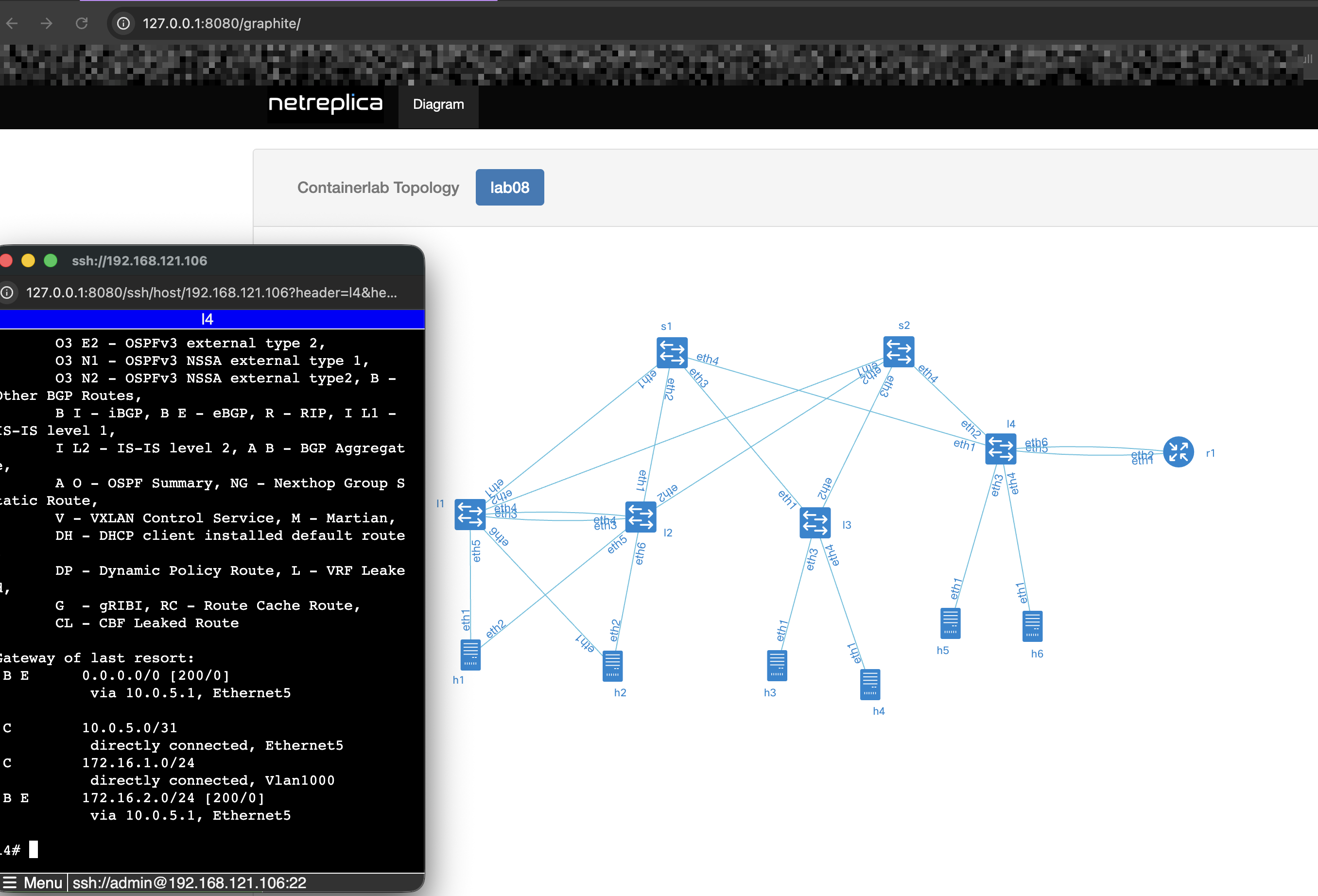
By the way, I forgot to mention a fantastic Netlab add-on tool that helps avoid confusion about how things are wired — Graphite. It provides a clear visualization of interface-level connectivity, showing exactly how devices are linked. Even better, it allows you to SSH into multiple devices simultaneously, which I find extremely convenient — especially if you’re not a fan of tmux.
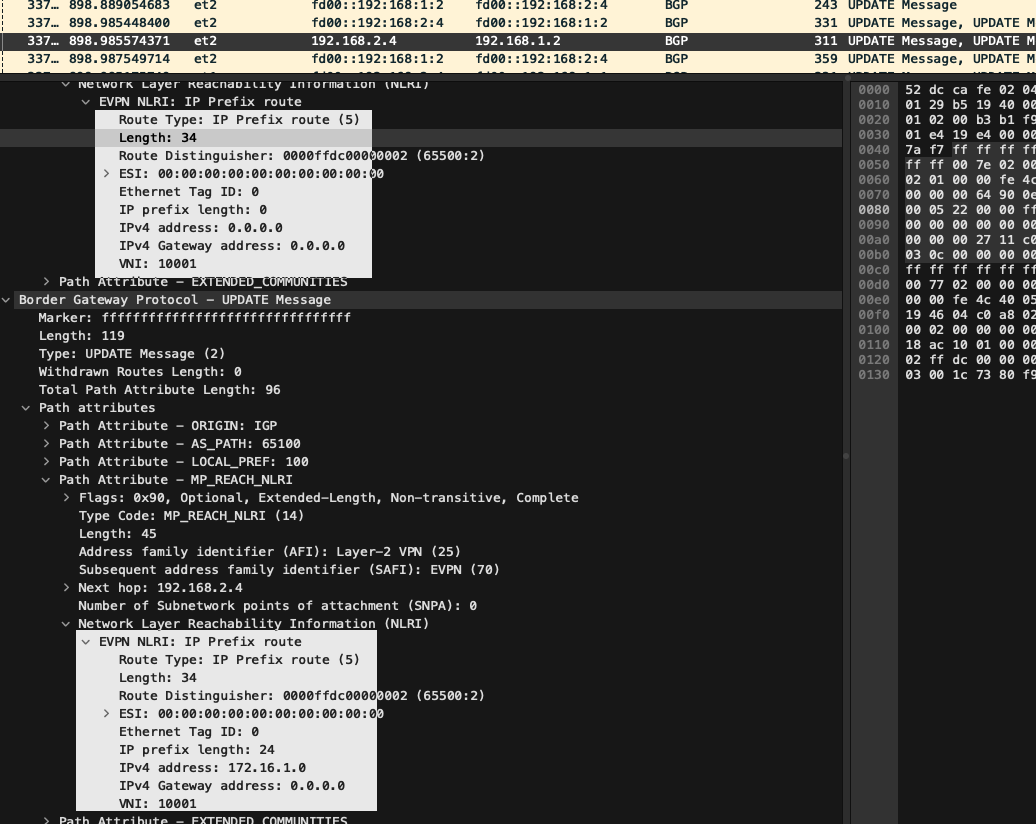
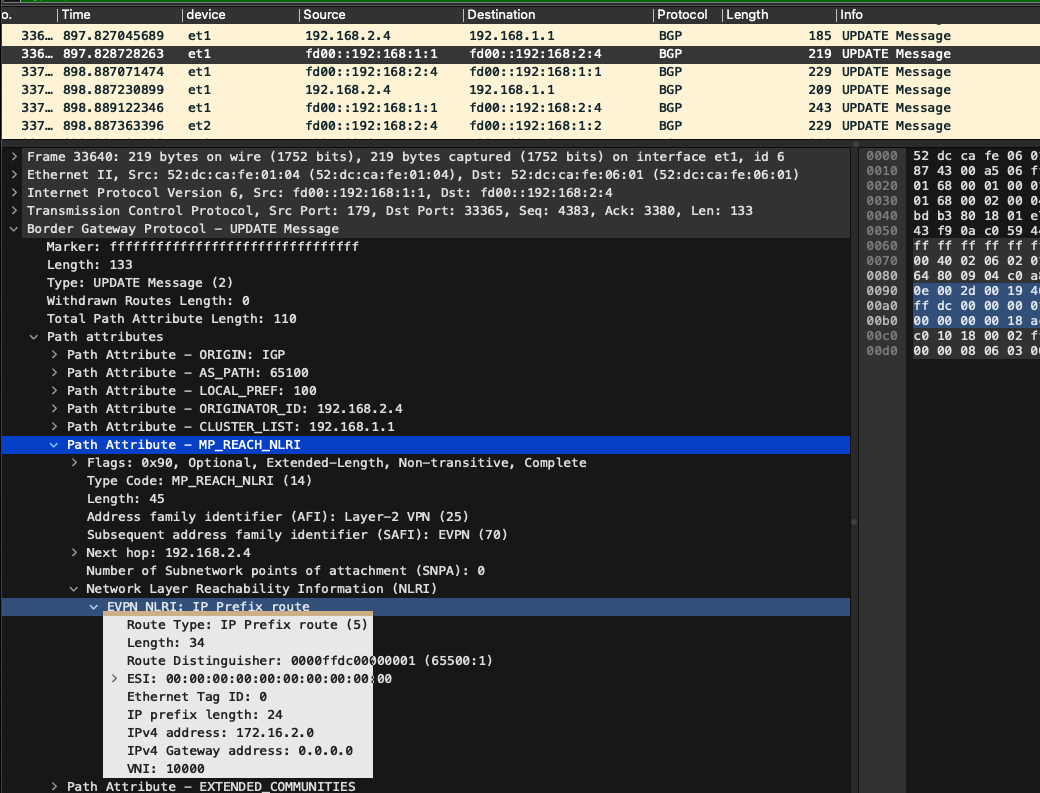
 Some capture from leaf-4
EVPN Type 5 routes advertised to spines
Some capture from leaf-4
EVPN Type 5 routes advertised to spines
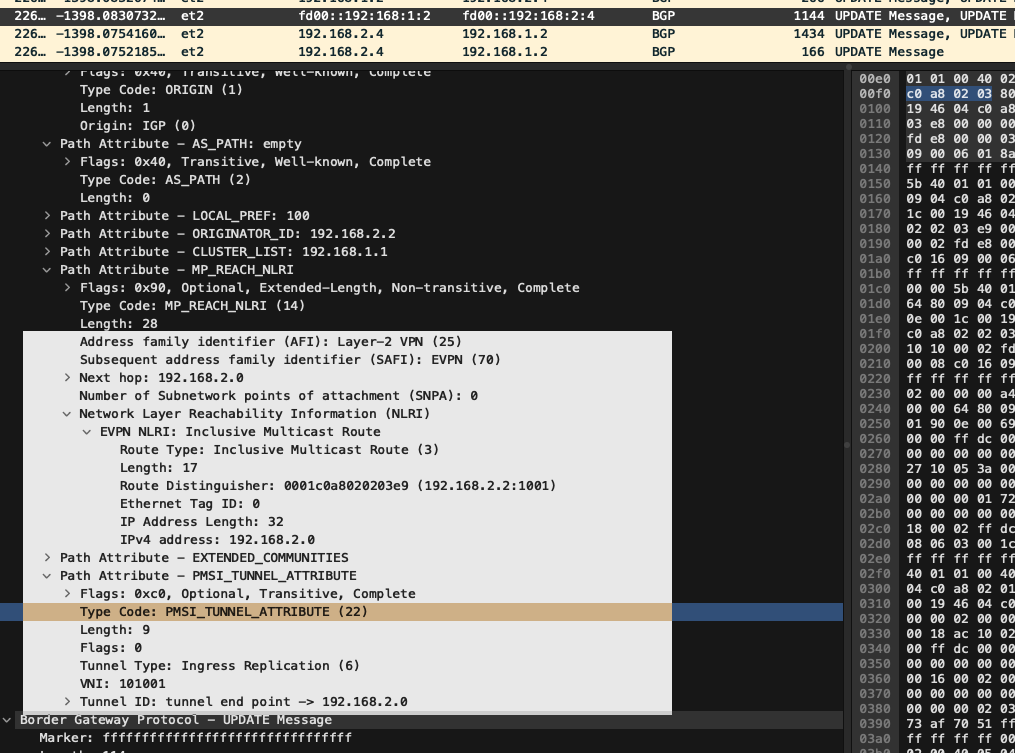
 EVPN Type 3 routes
 Looking at the ICMP traffic on leaf-4, we observe that:
• The incoming packet arrived from the fabric via VNI 10000, which corresponds to VRF red using EVPN Type 5 (IP prefix route).
• The reply packet, however, was sent out via VNI 10000 mapped to VLAN 1000 using EVPN Type 3 (MAC/IP advertisement).
Clearly, something got mixed up — likely a VNI-to-VRF or VLAN mapping inconsistency, or a misinterpretation of how Type 5 and Type 3 routes are being handled.
Looking at the ICMP traffic on leaf-4, we observe that:
• The incoming packet arrived from the fabric via VNI 10000, which corresponds to VRF red using EVPN Type 5 (IP prefix route).
• The reply packet, however, was sent out via VNI 10000 mapped to VLAN 1000 using EVPN Type 3 (MAC/IP advertisement).
Clearly, something got mixed up — likely a VNI-to-VRF or VLAN mapping inconsistency, or a misinterpretation of how Type 5 and Type 3 routes are being handled.
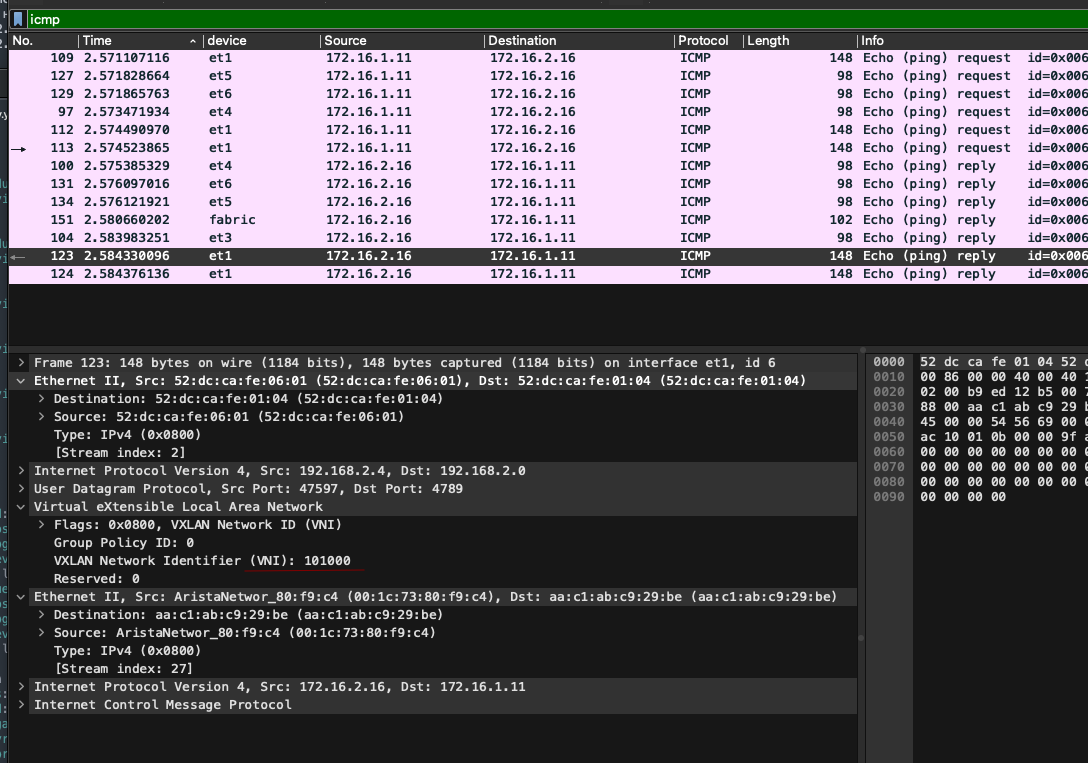
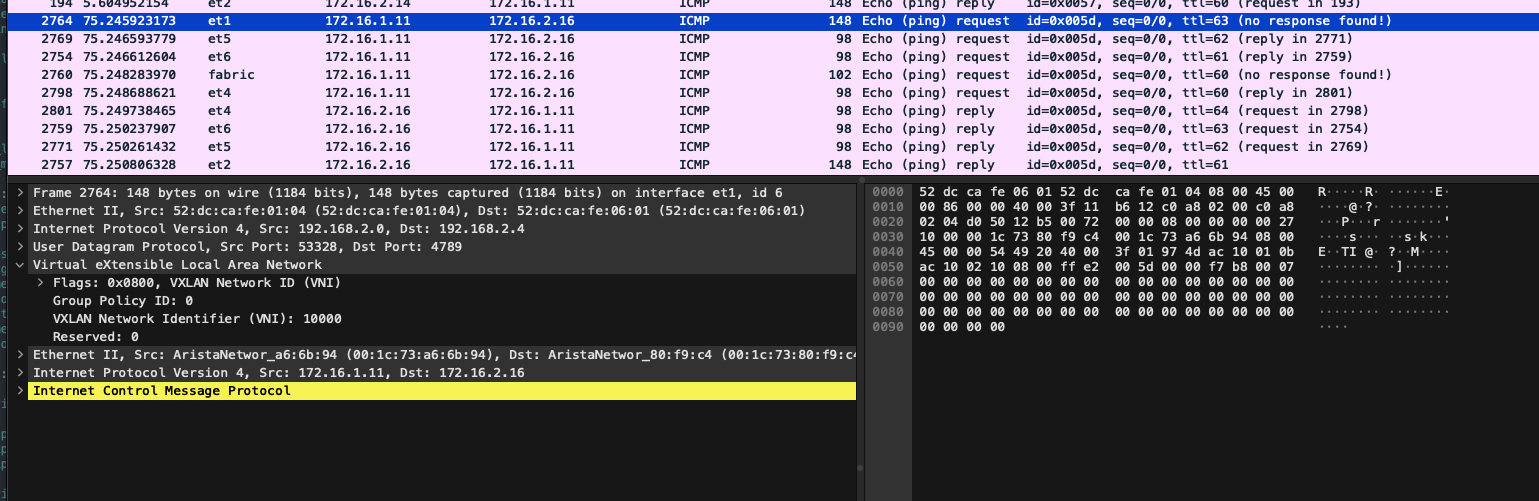 The easiest way to observe traffic flow across the fabric turned out to be L3 ping tests between hosts connected to it in different VRFs.Here’s what we see:
1\. A request from h3 is sent into the fabric
2\. That same request returns from the fabric
3\. A reply from h4 is sent into the fabric
4\. The reply arrives back from the fabric
In the reverse direction, the same pattern is observed — but over IPv6.
This confirms that inter-VRF routing via the fabric is functioning, and that Type 5 route propagation is correctly enabling bidirectional communication.
The easiest way to observe traffic flow across the fabric turned out to be L3 ping tests between hosts connected to it in different VRFs.Here’s what we see:
1\. A request from h3 is sent into the fabric
2\. That same request returns from the fabric
3\. A reply from h4 is sent into the fabric
4\. The reply arrives back from the fabric
In the reverse direction, the same pattern is observed — but over IPv6.
This confirms that inter-VRF routing via the fabric is functioning, and that Type 5 route propagation is correctly enabling bidirectional communication.
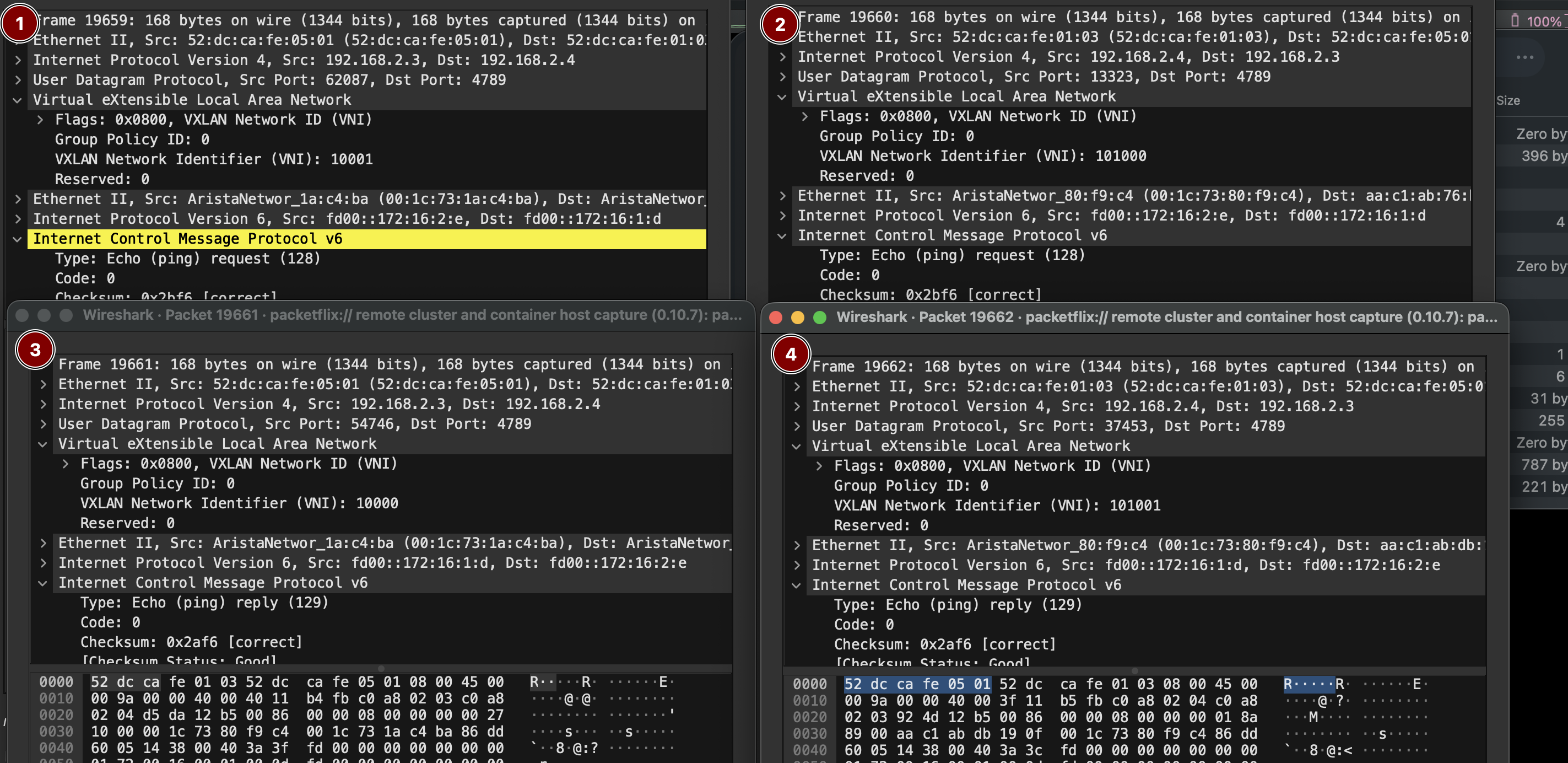
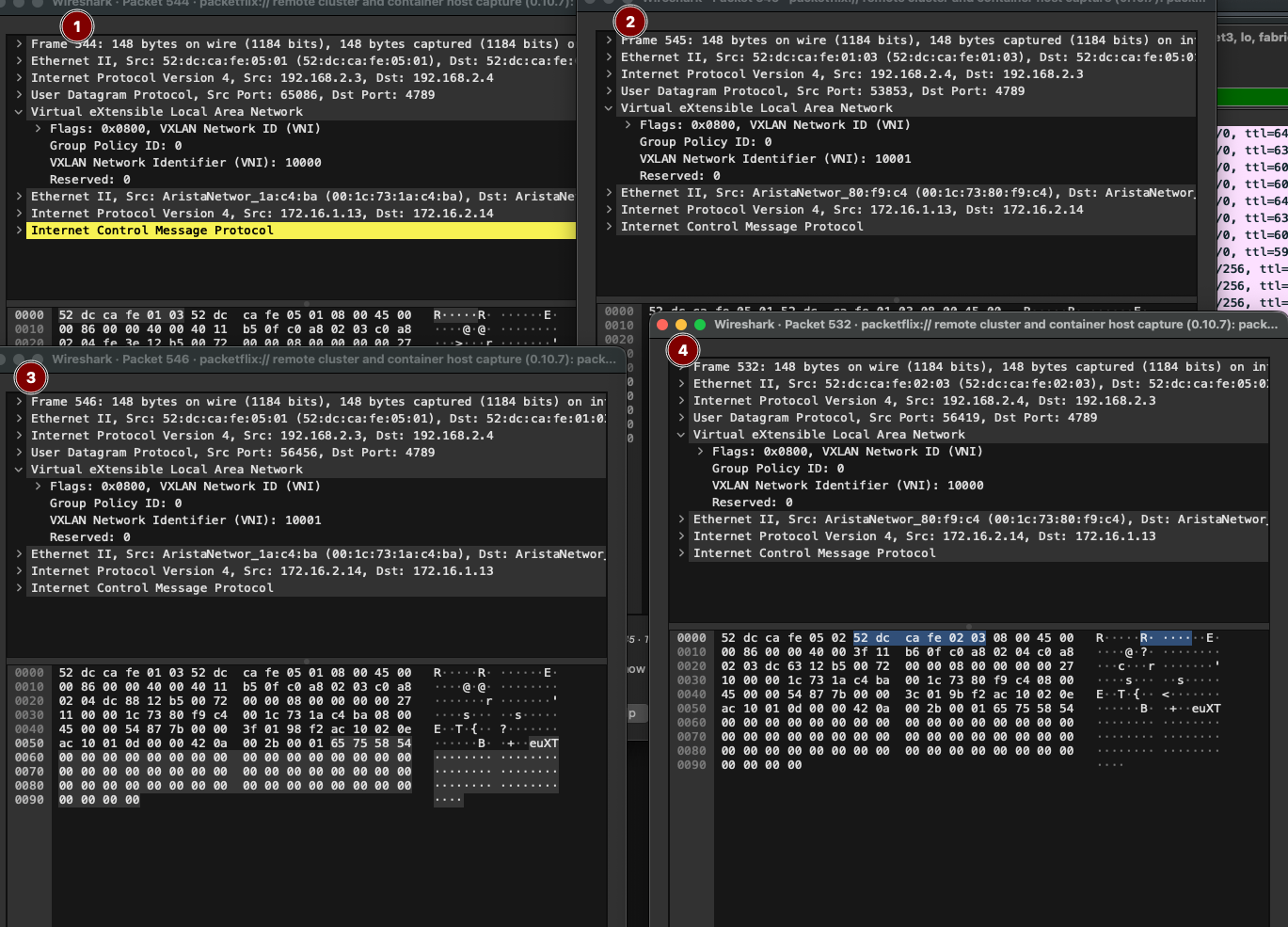 If we look at Layer 2 connectivity, we’ll see that ping traffic within the fabric travels over isolated VXLAN segments.

1,2 VRF red; 3,4 VRF blue. That wraps up the lab setup.
Device configuration files:
[Spine-1](https://github.com/aeangel/otus-DC-net/blob/main/lab08/s1.cfg) [Spine-2](https://github.com/aeangel/otus-DC-net/blob/main/lab08/s2.cfg) [Leaf-1](https://github.com/aeangel/otus-DC-net/blob/main/lab08/l1.cfg) [Leaf-2](https://github.com/aeangel/otus-DC-net/blob/main/lab08/l2.cfg) [Leaf-3](https://github.com/aeangel/otus-DC-net/blob/main/lab08/l3.cfg) [Leaf-4](https://github.com/aeangel/otus-DC-net/blob/main/lab08/l4.cfg) [Router-1](https://github.com/aeangel/otus-DC-net/blob/main/lab08/r1.cfg)
If we look at Layer 2 connectivity, we’ll see that ping traffic within the fabric travels over isolated VXLAN segments.

1,2 VRF red; 3,4 VRF blue. That wraps up the lab setup.
Device configuration files:
[Spine-1](https://github.com/aeangel/otus-DC-net/blob/main/lab08/s1.cfg) [Spine-2](https://github.com/aeangel/otus-DC-net/blob/main/lab08/s2.cfg) [Leaf-1](https://github.com/aeangel/otus-DC-net/blob/main/lab08/l1.cfg) [Leaf-2](https://github.com/aeangel/otus-DC-net/blob/main/lab08/l2.cfg) [Leaf-3](https://github.com/aeangel/otus-DC-net/blob/main/lab08/l3.cfg) [Leaf-4](https://github.com/aeangel/otus-DC-net/blob/main/lab08/l4.cfg) [Router-1](https://github.com/aeangel/otus-DC-net/blob/main/lab08/r1.cfg)